
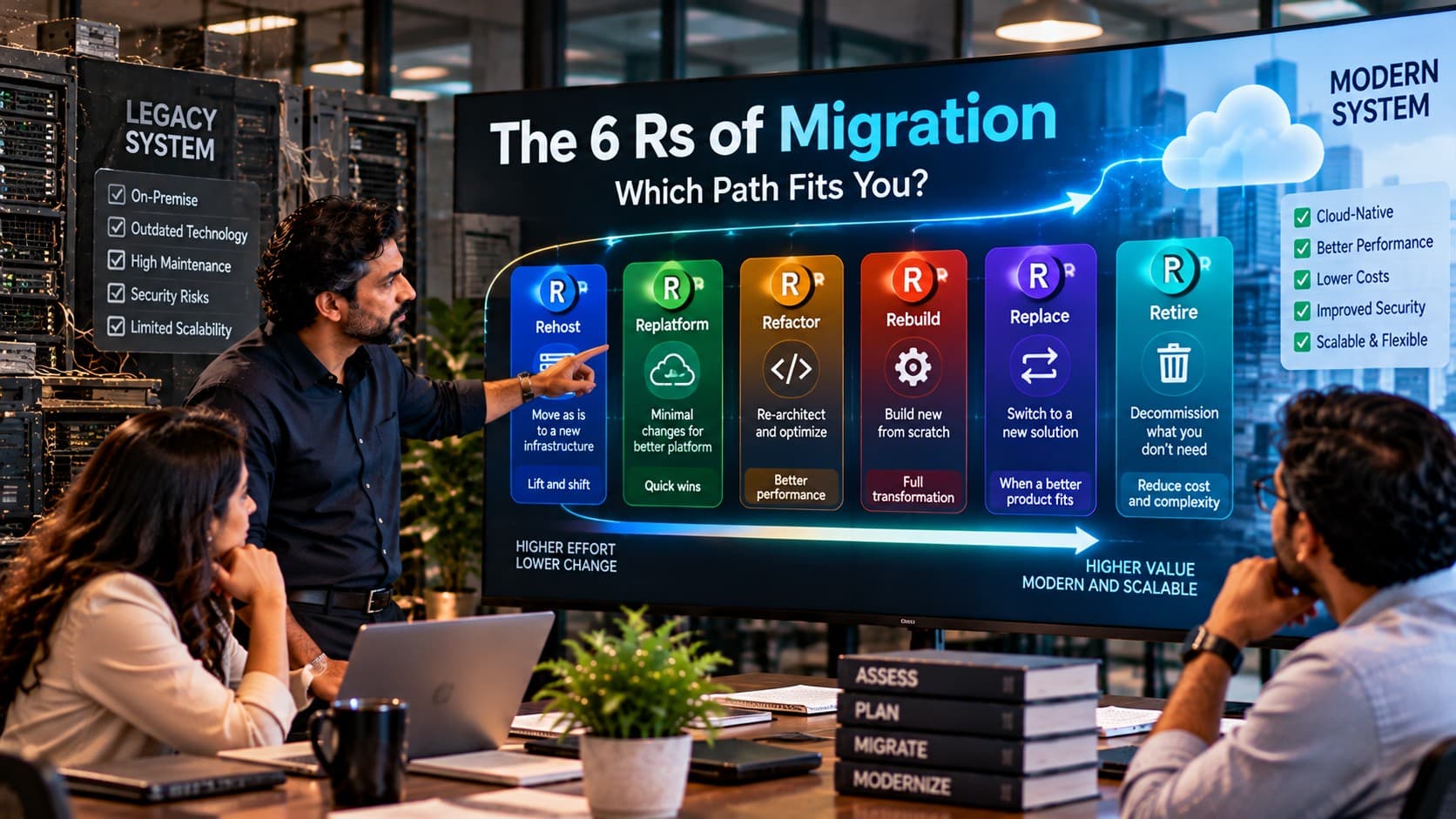
Six migration strategies, six different trade-offs. See when to move an application, reshape it, replace it or switch it off—and how to defend the decision.
One Portfolio, Six Different Decisions
A migration programme rarely fails because its team cannot move an application. It struggles when several different workloads are forced through the same migration plan. The customer portal may be stable but expensive to host. A warehouse tool may depend on undocumented code. A reporting application may no longer have users. Treating all three as rewrite candidates wastes money and introduces unnecessary risk.
The 6 Rs of migration provide a practical way to decide what should happen to each application: rehost, replatform, refactor, rebuild, replace or retire. Each path changes a different amount of software, infrastructure and business process. The correct answer depends on why the workload exists, how it is maintained and what outcome is required.
For CTOs, IT managers and technical founders, the key is to select an approach per workload rather than announce that the entire estate will move to the cloud. An inventory, evidence of actual use and explicit constraints should come before any target architecture.
This six-path article uses a business-modernization vocabulary. It is not the same taxonomy as AWS’s current seven-R framework, which includes retain, relocate and repurchase instead of this article’s standalone rebuild and replace labels. AWS documents its own classification in its migration strategy guidance.
What Do the 6 Rs of Migration Mean?
The six migration paths describe how much of an existing application you keep and what you change. Rehost moves it largely unchanged; replatform changes its runtime or hosting services; refactor improves its internals; rebuild creates new software; replace adopts another product; and retire removes the workload.
These are decision categories, not guaranteed steps in a fixed sequence. A team can rehost a system now and refactor it later. Another application may be retired immediately. The migration plan should explain the business trigger and the acceptance criteria for each choice.
| Path | What stays | Typical reason | Main caution |
|---|---|---|---|
| Rehost | Application and most architecture | Move hosting quickly | Old technical debt remains |
| Replatform | Core application behaviour | Reduce infrastructure operations | Runtime incompatibilities |
| Refactor | Business capabilities and much code | Improve maintainability or scalability | Regression and scope growth |
| Rebuild | Validated business requirements | Replace unsustainable code | Undocumented rules may be lost |
| Replace | Business outcome, not custom code | Use a suitable existing product | Workflow and data fit |
| Retire | Required records only | Remove unnecessary applications | Hidden dependencies or retention duties |
Rehost: Move the Workload Before Changing the Code
Rehosting, often called lift and shift, moves an application to a new infrastructure environment with limited application-level change. It fits an urgent data-centre exit, a supported application that performs acceptably, or a workload whose redesign would delay a necessary hosting transition.
For example, an internal order-tracking system may move from on-premises virtual machines to cloud virtual machines while preserving its database and core behaviour. The immediate deliverable is an operationally equivalent environment, not a new product.
When rehosting makes sense
- The application is stable and the main driver is hosting risk or capacity.
- A deadline demands a controlled, relatively narrow change.
- The team can test network, identity, backup and recovery behaviour in the target environment.
Watch for: persistent licensing costs, old operating systems, latency to on-premises dependencies and assumptions about shared storage. Rehosting unsupported code does not make it supported. Establish operational baselines before moving, then test recovery rather than relying only on a successful deployment.
A rehost can be a rational first stage, but it should not become an excuse to postpone known security or maintainability problems indefinitely.
Not Sure Which Migration Path Is Justified?
Compare the real constraints before committing an application to a rewrite or a hosting move.
Review Legacy Migration OptionsReplatform: Improve the Operating Environment Without a Rewrite
Replatforming modifies the hosting or supporting platform while preserving most application logic. Examples include moving a database to a managed database service, containerising a supported application, or updating the deployment environment without fundamentally redesigning the business workflow.
It is attractive when infrastructure maintenance consumes engineering time but the application itself still meets functional needs. Teams may gain more consistent backups, deployments or operations, but those outcomes depend on the target service and architecture.
Technical checks before approving replatforming
- Validate driver, database and runtime version compatibility.
- Test background jobs, file-system assumptions and scheduled tasks.
- Measure database performance, network round trips and connection limits.
- Confirm observability, security controls and rollback procedures.
The danger is calling a change minor because business screens look unchanged. Differences in transaction behaviour, time zones, file handling or database collation can alter outcomes. Use representative tests and a production-like dataset before cutover.
Refactor: Change the Internals While Protecting Behaviour
Refactoring is appropriate when the application still carries valuable business logic, but its implementation makes changes slow, unsafe or expensive. A team might isolate a pricing engine, separate tightly coupled modules, replace brittle database access or introduce API boundaries without changing the core user journeys.
The boundary between refactoring and rearchitecting is not universal. In this guide, refactor includes purposeful internal restructuring; major capability redesign may deserve treatment as a separate architecture programme. Make the intended behavioural changes explicit rather than burying new product scope inside technical work.
Where teams underestimate refactoring
Regression testing becomes the principal control. Legacy code may depend on implicit ordering, hidden database triggers or integrations no longer documented. Introduce contract tests around critical calculations and transaction paths before changing their internals.
A practical approach is to refactor one bounded capability, deploy it with observability, and prove that customers and downstream systems continue to receive expected results. The existing KSoft legacy application migration guide discusses migration planning and continuity considerations that complement this decision.
Rebuild: Start Fresh When the Existing Code Cannot Carry the Future
Rebuilding means implementing a new application from validated requirements rather than attempting to preserve the existing codebase. Choose it only when the code is beyond economical repair, the necessary architecture differs substantially, or the business must change how the product works.
A rebuild is not simply a technology-stack upgrade. Business rules must be rediscovered, edge cases reconstructed, integrations mapped and historical data handled. A functional specification based only on current screens often misses years of operational decisions encoded in batch jobs and manual workarounds.
Control the scope before authorising a rebuild
- Identify the smallest set of capabilities the business cannot operate without.
- Document data lineage, accounting rules, approvals and exception handling.
- Agree on coexistence and migration waves instead of assuming a single cutover.
- Plan acceptance testing with actual users and representative records.
For a business-critical system, a staged rebuild can preserve service while new components replace old ones. But coexistence introduces synchronisation complexity; assign a source of truth for each data domain before splitting workloads.
Replace: Buy the Capability Instead of Maintaining Custom Software
Replacement means moving from a bespoke or unsuitable legacy application to a commercial, SaaS or otherwise available solution. It can be sensible when the business process is standard enough that an established product serves it without extensive custom development.
Consider payroll, expense approvals or a basic CRM. A purpose-built product may provide support, integrations and change management options that a small internal team cannot sustainably maintain. That does not mean the subscription price is the full project cost.
Test business fit, not just the feature checklist
Run the organisation’s hardest real-world workflows through the candidate product: unusual approval chains, international tax cases, multi-warehouse stock moves or partial refunds. Document configuration limits, export rights, identity integration and vendor exit terms.
Replacement fails when teams discover that apparently small customisations encode legally or operationally essential behaviour. Compare total lifecycle cost, migration effort and ongoing vendor dependence rather than selecting solely on a demo.
Choose a Migration Strategy With a Defensible Technical Plan
Map business-critical dependencies, target environments and test gates before changing production.
Discuss a Migration AssessmentRetire: Remove the Applications No Longer Worth Carrying
Retirement is a valid modernisation outcome, not a failure to migrate. If an application has no active users, duplicates a capability or exists solely because nobody has approved its removal, keeping it can preserve avoidable licensing, operational and security exposure.
Start with evidence: access logs, job schedules, integration calls, data-retention rules and the business owner’s sign-off. The service may appear idle but still produce monthly exports or feed another system. Shut down only after those dependencies are understood.
What must survive retirement?
The application may be disposable while its records are not. Set clear archival formats, retention periods, access controls and retrieval responsibilities. Confirm legal and contractual requirements with appropriate advisers; do not assume one retention period fits every jurisdiction.
A controlled retirement should include a documented rollback window where feasible, a communications plan, archive verification and a final check that automated jobs no longer rely on the system.
How Do You Choose the Right R for Each Application?
Choose a migration path by evaluating the application’s business value, technical health, urgency, integration dependencies and acceptable disruption. A stable system with a hosting deadline may be rehosted; useful software with operational burdens may be replatformed; unmaintainable code may require refactoring or rebuilding. Unneeded systems should be assessed for retirement.
A six-question application decision record
- Business need: Which outcome does the application deliver, and who owns it?
- Technical condition: What support, security and change risks exist?
- Constraints: Which deadlines, budgets and compliance requirements are fixed?
- Dependencies: Which systems, jobs and data stores will be affected?
- Option comparison: Which two approaches are viable, and why reject the others?
- Proof: What measurable test must pass before approving cutover?
Score each workload with a short decision note, not an arbitrary single number. A high business-criticality score may justify a conservative transition even when the target architecture could be more ambitious. Record uncertainty rather than hide it in a green status indicator.
The most useful output is a portfolio map: each application, its owner, selected R, justification, dependencies, acceptance tests and migration wave.
A Practical Scenario: Three Systems, Three Different Paths
Consider an illustrative wholesale distributor running a decade-old warehouse application, a simple internal reporting site and an accounting integration service. Its IT manager has been asked to “move everything to the cloud” within the next planning cycle. That single instruction conceals three different decisions.
The warehouse application is business-critical and tightly linked to handheld scanners. Rather than rebuild immediately, the team investigates replatforming its database while preserving device workflows. The reporting site has almost no usage and duplicates reports already available in the ERP; it becomes a retirement candidate after data-access checks. The accounting service contains useful business rules but fragile interfaces, so it is refactored behind tested APIs.
None of these is a verified customer case or claim about actual outcomes. The scenario illustrates why workload-level choices are more defensible than one migration slogan. One discovery exercise can lead to three valid paths, each with different tests and ownership.
What Can Go Wrong Even After You Pick the Right Strategy?
Choosing an appropriate R does not eliminate execution risk. Dependencies, data accuracy and rollback design often determine whether a project can be deployed safely. Before any cutover, compare the new environment with known business outcomes rather than assuming healthy infrastructure metrics prove successful migration.
Five controls worth making non-negotiable
- Dependency inventory: include vendors, identity providers, batch jobs and human exports.
- Business-rule tests: verify pricing, tax, approval and exception scenarios.
- Data reconciliation: compare record counts, balances and critical identifiers.
- Rollback ownership: define the trigger, responsible person and available recovery window.
- Operational acceptance: confirm alerting, support playbooks, backups and access controls.
Cloud provider checklists are helpful, but they do not know which business exception keeps your company running. Align migration gates with real operations and document what happens when a gate fails.
Should You Move First and Modernize Later?
Moving first and modernizing later can be a sound strategy when an infrastructure deadline is urgent and the application can run safely in the new environment. Rehosting or limited replatforming separates the hosting transition from deeper code changes. However, this sequencing is unsuitable if unsupported components or hidden dependencies make the interim state unsafe.
The deciding factor is whether the intermediate architecture is a manageable state rather than a new long-term liability. Set an explicit post-migration workstream with owners and dates for unresolved security, performance and maintenance issues.
KSoft Technologies describes assessment-led planning and phased migration on its legacy application modernization service page. For teams evaluating a programme, the useful first deliverable is a written inventory and option comparison, not an immediate commitment to rebuild.
Start With a Portfolio Decision, Not a Cloud Shopping List
Every application has its own reason to stay, change or disappear. Start by asking which capability the business must preserve, which technical condition cannot continue and which evidence will prove a safer future state.
Then select one of the six paths and record why the alternatives were rejected. You may find that a rehost meets this quarter’s deadline, a refactor solves a long-standing integration problem, and retiring an unused application delivers the cleanest result. Those decisions can coexist within one programme.
Before approving funding, have the business owner and technical owner sign off on the same acceptance criteria. A roadmap with explicit trade-offs gives technical teams space to execute while giving leadership a clearer basis for investment and risk decisions.
Make Every Legacy Migration Decision Traceable
Review your application portfolio, identify the highest-risk dependencies and choose a realistic first migration wave.
Plan Your Modernization RoadmapFrequently Asked Questions
What are the six Rs in this migration guide?
This guide uses rehost, replatform, refactor, rebuild, replace and retire. They describe six possible outcomes for a legacy workload, from moving existing software to discontinuing it. The labels help organise business decisions, but they are not a single universal cloud standard. Define each term in your programme before assigning ownership and budgets.
Why does AWS describe seven Rs instead of these six?
AWS currently documents seven approaches: retire, retain, rehost, relocate, repurchase, replatform and refactor or re-architect. This article instead treats rebuild and replace as explicit business-modernisation choices. The models overlap but are not identical. When comparing vendor proposals, map terminology to the actual activities and acceptance criteria rather than assuming matching labels.
How is rehosting different from replatforming?
Rehosting generally moves the application with minimal software changes, whereas replatforming adjusts its hosting or runtime services while keeping most business logic. Moving a virtual machine is a common rehost example; adopting a managed database can be a replatform example. Both require testing, but replatforming often introduces additional compatibility risks.
What separates refactoring from rebuilding a legacy application?
Refactoring keeps valuable existing code or business behaviour while improving its structure. Rebuilding implements new software from validated requirements and may use little or none of the original code. Choose based on code health, undocumented rules and the required change. A rebuild usually demands greater product discovery and careful business acceptance testing.
When is replacement better than custom development?
Replacement is attractive when an available product supports the essential workflow with acceptable configuration, security and integration options. Custom development may remain appropriate for distinctive processes that provide competitive value. Evaluate real exception cases and migration costs before deciding. A low subscription price does not guarantee the lowest total cost of ownership.
Can one migration programme use multiple Rs?
Yes. Different applications within a portfolio can legitimately follow different strategies. An internal portal might be rehosted, a database-backed service replatformed and an unused tool retired. Document the owner, dependencies, target state and sign-off criteria for each workload. This is more precise than prescribing a single strategy for every system.
Should we retire an application that nobody uses?
Low usage makes retirement worth investigating, but it does not prove the application is safe to remove. Look for scheduled jobs, API consumers, regulatory records and occasional operational dependencies. Obtain business-owner approval and confirm archives can be retrieved. Retirement should be managed as a controlled change rather than an unannounced server shutdown.
Can our internal IT team select a migration path without a consultant?
An internal team can make the decision when it has reliable inventory data, clear business ownership and enough architecture, security and operational expertise. An external review can be useful for complex integrations, undocumented systems or contested trade-offs, but it is not automatically necessary. The essential requirement is a documented, testable decision.
What should we assess before a cloud migration starts?
Assess application ownership, actual usage, runtime support, licensing, data flows, third-party integrations, recovery requirements and security constraints. Gather performance baselines and sample business transactions for testing. Identify which functions cannot tolerate downtime. This information allows the team to compare migration approaches against actual operational risk rather than relying on assumptions.
How long does a migration usually take?
Migration duration depends on application complexity, data volume, external interfaces, testing depth, regulatory requirements and the chosen strategy. A contained rehost may require less application change than a rebuild, but difficult dependencies can delay either one. Estimate work after discovery and include validation, rehearsal, rollback planning and business sign-off in the schedule.
How do we compare migration costs fairly?
Compare more than initial implementation fees. Include hosting, licensing, engineering, security controls, support, training, data conversion, testing and eventual exit costs. Assess the cost of operational disruption and technical debt that remains after migration. Use the same planning horizon for each option so a cheaper short-term move is not mistaken for the best long-term decision.
What should the first migration deliverable be?
Start with a workload inventory and a short decision record for each application. Capture its owner, business value, technical condition, dependencies, recommended path and evidence required for approval. Select one low-risk pilot to test the team’s deployment, monitoring and recovery process. Do not begin with a cloud product list or an unsupported rewrite estimate.