
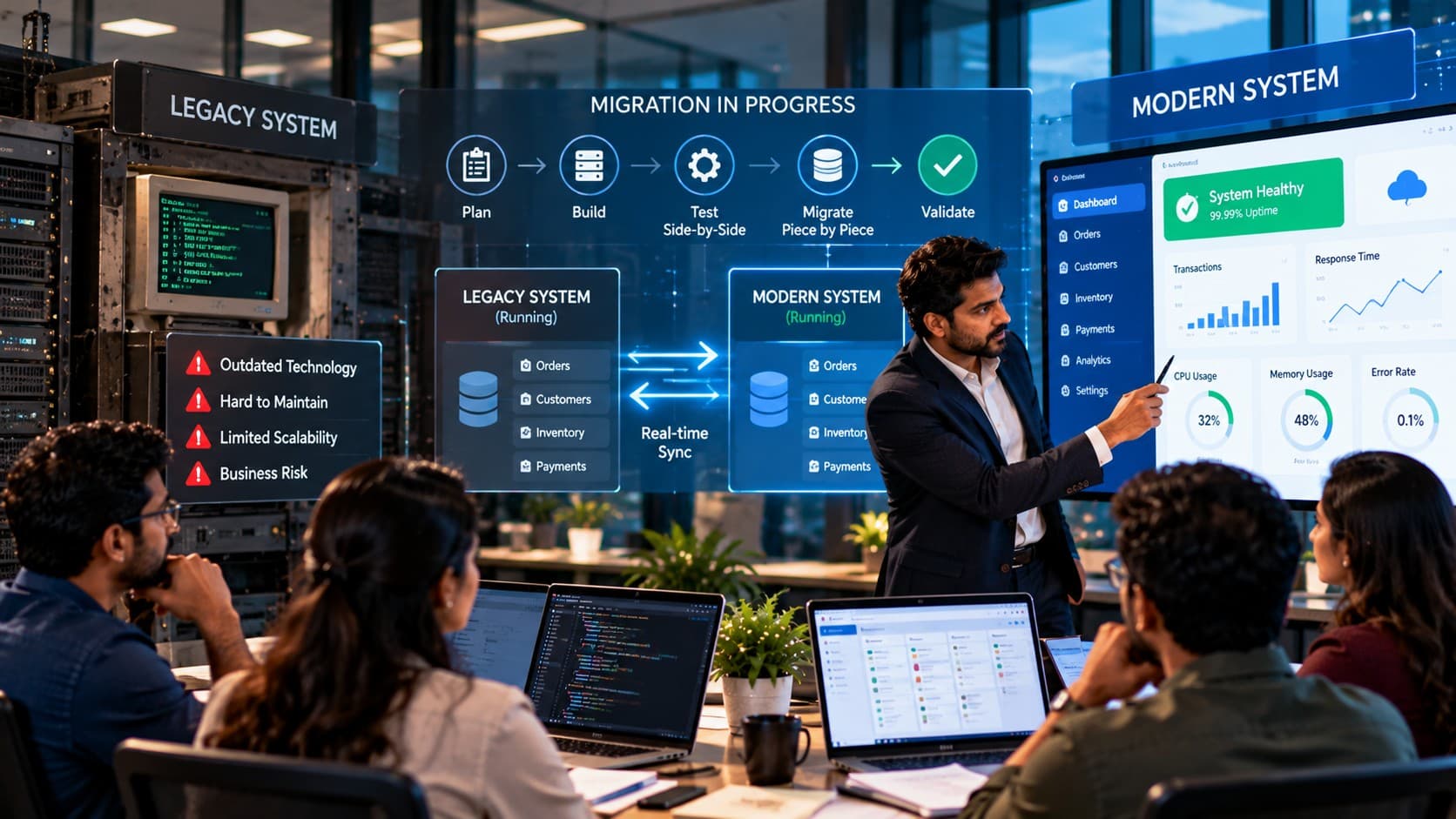
A legacy migration does not have to mean shutting the business down for a weekend. The safer approach is to run old and new systems side by side, move controlled pieces gradually, keep data synchronized, and cut over only when each path is proven.
The most dangerous sentence in a legacy migration plan is often: “We will switch everything over this weekend.”
For a business running an old ERP, in-house .NET application, PHP system, Microsoft Access database, or desktop application, that approach concentrates years of technical dependencies into one high-risk event. If data conversion fails, an integration behaves differently, or one operational workflow was missed during testing, Monday morning becomes the test environment.
A zero downtime legacy system migration takes a different approach. The old system stays available while the modern replacement is introduced beside it. Data is synchronized, individual capabilities are validated, users are moved in controlled stages, and the legacy application is retired only after the new path has proved it can carry the business safely.
“Zero downtime” does not mean zero risk or zero planning. It means the migration is designed so modernization does not depend on one long outage and one irreversible cutover.
The first step is understanding why the traditional dark-weekend migration creates so much avoidable risk.
Why Are Dark-Weekend Cutovers So Risky?
A dark-weekend cutover is risky because it compresses data migration, application switching, integration validation, user verification, and rollback decisions into one narrow outage window. The larger and older the system, the more likely hidden dependencies will only become visible when real business processes begin using the replacement.
The attraction is understandable.
Shut the old system down on Friday evening. Migrate the database. Deploy the modern application. Reconnect integrations. Run tests. Start Monday on the new platform.
On a diagram, it looks clean.
In an operational business, it creates a single point of failure for the migration itself.
Legacy systems contain more than visible application screens
An ERP or long-running in-house system may have accumulated years of dependencies that are not obvious from the main codebase.
The application may depend on:
- scheduled database jobs;
- shared folders and file imports;
- spreadsheet exports used by finance or operations;
- direct database queries from reports;
- desktop applications connecting to the same database;
- third-party APIs;
- printers, scanners, or warehouse devices;
- email or SMS processes;
- undocumented manual workarounds.
A team can successfully migrate the application and still break the business process around it.
Test data rarely behaves exactly like production data
Legacy databases often contain years of historical records, exceptions, duplicate patterns, old formats, nullable fields, and records created under previous versions of the software.
A migration script that works perfectly on a clean staging sample may behave differently against the complete production dataset.
Common problems include:
- character-encoding differences;
- inconsistent date formats;
- missing foreign-key relationships;
- old records that violate modern validation rules;
- duplicate identifiers;
- fields whose business meaning changed over time.
Discovering one of these problems during a fixed outage window creates pressure to choose between extending the outage and accepting incomplete data.
Integrations fail at the boundaries
A modern replacement may work correctly by itself and still fail when connected to the rest of the company's environment.
An old ERP might send files to accounting software. A PHP application may expose endpoints consumed by a mobile app. An Access system may read data from SQL Server while exporting reports to Excel. A desktop application may depend on a network path that nobody included in the architecture documentation.
These boundaries are where migration risk becomes operational risk.
A large cutover creates a difficult rollback
Rollback sounds simple before the migration:
“If something fails, we will switch back.”
The difficult question is:
“What happens to data created after the new system goes live?”
If users entered orders, invoices, inventory transactions, service records, or customer changes into the new platform, returning to the old system may require moving those transactions backward safely.
A rollback plan that only considers application deployment is incomplete.
Monday morning should not be the final acceptance test
A migration is not proven because the login screen loads and several technical checks pass.
Real acceptance means the business can still complete its critical workflows:
- receive an order;
- update stock;
- create an invoice;
- process an approval;
- generate an operational report;
- exchange data with connected systems;
- recover correctly when something fails.
Those workflows should be proven before the old system becomes unavailable.
The safest migration is not the one with the most detailed weekend checklist. It is the one that reduces how much has to succeed at the same moment.
Zero-Downtime Migration Starts With Running Old and New Together
A zero-downtime migration reduces cutover risk by allowing the legacy application and the modern replacement to coexist for a controlled period. Instead of replacing the whole system in one event, the migration introduces the new platform beside the old one, synchronizes the required data, validates each business path, and moves traffic or users gradually.
The principle is simple:
Build the replacement before removing the thing the business already depends on.
That changes the migration from one irreversible switch into a sequence of smaller decisions.
Side-by-side does not mean duplicating everything forever
The legacy and modern applications only need to coexist long enough to make the transition safe.
During that period, different parts of the workload may be handled differently.
For example:
- authentication may remain on the old system initially;
- a new reporting module may read synchronized data from the modern database;
- one customer group may use the new order workflow while others remain on the legacy application;
- historical records may remain read-only in the old system while new transactions move to the replacement;
- selected integrations may be redirected one at a time.
The exact sequence depends on the architecture, but the objective remains the same: reduce the blast radius of each change.
Decide what the system of record is during every phase
Running two systems creates an important question:
“Which one owns the authoritative version of this data right now?”
The answer may change as migration progresses.
Early in the project, the legacy database may remain the system of record while the modern application receives replicated data for testing and read-only functions.
Later, a migrated module may become authoritative for new transactions while updates are synchronized back to the old environment temporarily for compatibility.
Ownership must be explicit for:
- customers;
- orders;
- products;
- inventory;
- invoices;
- user accounts;
- workflow states;
- reference data.
Without that rule, side-by-side operation can create conflicting updates and reconciliation problems.
Start with low-risk read paths when possible
Read-only functionality can provide a useful first migration boundary because it introduces modern components without immediately changing production records.
A team might first move:
- dashboards;
- reporting;
- search;
- customer history views;
- document retrieval.
Once data synchronization and application behavior are proven, higher-risk transactional workflows can follow.
Migrate around business capabilities, not arbitrary code folders
A useful migration unit is something the business can recognize and test.
Examples include:
- customer management;
- purchasing;
- order entry;
- inventory;
- invoicing;
- reporting;
- approvals.
Moving a capability gives the migration team a clear boundary, an accountable owner, testable workflows, and a defined cutover decision.
Keep the old path available until the new path is proven
The advantage of parallel operation is not simply that two applications are online.
It is that the migration team retains options.
If the modern workflow fails validation, users can remain on the legacy route while the issue is corrected.
If reconciliation shows unexpected differences, the next migration stage can pause without stopping the existing business process.
If one integration is not ready, the rest of the modernization does not have to wait for a single all-or-nothing launch.
Parallel running requires discipline
Side-by-side migration is safer, but it is not automatic.
The migration plan still needs clear controls for:
- data synchronization;
- transaction ownership;
- user routing;
- integration routing;
- monitoring;
- reconciliation;
- rollback;
- retirement of the old path.
The benefit is that each control can be tested in smaller stages rather than for the first time during one major outage.
Zero downtime is achieved by reducing dependency on a single cutover event, not by pretending the cutover has no risk.
Is Migration Downtime Keeping Your Legacy System in Place?
Review your dependencies, data flows, integrations, and cutover risks before deciding whether the system needs a phased migration, replatform, refactor, or rebuild.
Assess Your Migration PathMap the Legacy System Before Moving Anything
A zero-downtime legacy migration starts with discovery, not development. Before replacing code, databases, infrastructure, or integrations, the migration team needs an accurate map of what the current system does, what depends on it, which data it owns, and which business processes cannot be interrupted.
The visible application is only one part of that map.
A legacy ERP or in-house platform may have been extended for years by different developers, departments, vendors, and administrators. Some dependencies may be documented. Others may exist only in scheduled tasks, spreadsheets, shared folders, database procedures, or the knowledge of a long-term employee.
Migrating safely means finding those dependencies before production traffic exposes them.
Start with business capabilities, not source-code directories
Technical documentation matters, but the first migration map should explain the system in terms the business recognizes.
Identify capabilities such as:
- customer registration and account management;
- order entry;
- purchasing;
- inventory movement;
- invoicing;
- payment processing;
- approvals;
- reporting;
- document generation;
- employee or vendor workflows.
Each capability becomes a candidate migration boundary later.
This is more useful than saying the migration will begin with “module A” or “folder B” when those technical divisions do not match the way the business actually operates.
Document every system that exchanges data
Legacy applications rarely operate alone.
Build an integration inventory that identifies:
- upstream systems that send data into the application;
- downstream systems that consume its data;
- APIs;
- file imports and exports;
- scheduled jobs;
- direct database connections;
- message queues;
- email or SMS services;
- reporting tools;
- third-party vendor systems.
For each integration, record the direction of data movement, frequency, authentication method, data format, failure behavior, and operational owner.
A forgotten integration can turn a technically successful migration into a business failure.
Identify the real system of record for each data domain
Legacy environments often contain multiple copies of the same information.
Customer data may exist in the ERP, CRM, accounting package, and spreadsheets.
Product data may be maintained in one system but enriched in another.
Employee information may exist in both a desktop application and an external payroll platform.
Before designing synchronization, decide which system is authoritative for each domain.
Useful domains might include:
- customers;
- suppliers;
- products;
- inventory;
- orders;
- invoices;
- payments;
- users and permissions;
- configuration and reference data.
Without a clear system-of-record decision, two live systems can both accept updates and quietly create conflicting data.
Trace critical workflows from beginning to end
Do not document only screens and database tables.
Trace complete workflows.
For example, an order-to-invoice process might include:
- customer or staff member creates an order;
- pricing rules are applied;
- stock availability is checked;
- approval is requested when required;
- inventory is reserved or reduced;
- fulfillment status changes;
- invoice data is generated;
- accounting receives the transaction;
- reports reflect the updated state.
A replacement must preserve the business outcome even if the modern implementation uses different APIs, services, tables, or user interfaces.
Find undocumented business rules
Some of the most important migration requirements do not exist in formal specifications.
They may appear as:
- validation inside old code;
- database triggers;
- stored procedures;
- spreadsheet formulas;
- manual approval steps;
- special handling for one customer type;
- employee workarounds developed over years.
Operations users are often as important to discovery as developers because they know what the system actually requires to complete the work.
Classify workflows by migration risk
Not every capability should move at the same stage.
A practical classification is:
- Low risk: Read-only reporting, search, dashboards, reference views.
- Moderate risk: Internal workflows with reversible changes and limited downstream dependencies.
- High risk: Orders, inventory, billing, payments, regulatory records, or processes with many integrations.
The exact categories will differ by business, but the migration sequence should reflect operational risk rather than developer convenience.
Understand when the system is actually allowed to change
A zero-downtime strategy still needs operational timing.
Identify:
- peak transaction periods;
- month-end or year-end processing;
- payroll windows;
- inventory counts;
- major customer deadlines;
- regulatory reporting periods;
- seasonal demand.
A phased cutover reduces outage risk, but it should still avoid introducing unnecessary change during the most sensitive operational periods.
Establish a baseline before modernization begins
The team needs to know what normal looks like before it can prove that the modern system behaves correctly.
Capture baseline information for critical workflows, such as:
- expected transaction volumes;
- common processing times;
- reconciliation totals;
- integration success and failure patterns;
- important reports;
- known exceptions.
These baselines give the migration team something concrete to compare against during parallel operation.
Define what cannot be lost
Every migration should explicitly identify critical data and transactions that require stronger controls.
Examples may include:
- financial transactions;
- inventory movements;
- customer orders;
- audit records;
- approvals;
- regulatory information;
- security and permission changes.
These areas may require reconciliation, immutable audit logging, additional validation, or stricter rollback rules during migration.
Do not begin a zero-downtime migration until you can explain what the current system owns, what depends on it, and which business workflows must continue working throughout the transition.
Build the Modern Stack Beside the Existing System
The modern platform should be introduced beside the legacy system, not underneath it in a way that requires the old application to disappear before the replacement is proven. This creates room to validate infrastructure, data movement, business logic, integrations, and user workflows while production continues operating on the established path.
The architectural goal is controlled coexistence.
Old and new components may both operate during the migration, but their responsibilities should be explicit at every stage.
Separate modernization from immediate replacement
A legacy modernization project often includes several changes at once:
- a new frontend;
- new backend services;
- database changes;
- cloud or server changes;
- new authentication;
- integration redesign;
- workflow changes.
Attempting to activate every change simultaneously increases the number of things that must work perfectly at cutover.
A staged architecture allows the team to modernize one layer or capability while preserving stable production behavior elsewhere.
Introduce a controlled boundary between old and new
The two environments need an intentional connection.
Depending on the legacy architecture, that boundary might use:
- APIs;
- integration services;
- message queues;
- database replication;
- change-data capture;
- scheduled synchronization;
- controlled file exchange.
The correct mechanism depends on transaction volume, consistency requirements, database technology, latency tolerance, and how easily the legacy application can be changed.
Put an API boundary in front of legacy logic when useful
Some older applications expose business logic only through screens, database procedures, or tightly coupled server code.
Where practical, introducing a service or API boundary can make that functionality accessible to the modern system without rewriting everything immediately.
For example, the new application might call a controlled service for:
- pricing;
- stock availability;
- customer validation;
- order creation;
- account balances.
The legacy code can continue performing the underlying operation temporarily while the new application becomes the user-facing path.
Later, the implementation behind that boundary can be replaced without forcing another user-facing migration.
Do not make the new system depend directly on every legacy table
Direct database access may appear to be the fastest bridge between systems.
It can also reproduce the same coupling that made the legacy platform difficult to change.
Where possible, place clear interfaces around legacy data and business rules instead of allowing every new component to query old tables independently.
This creates a cleaner path for eventual retirement.
Build observability before moving production traffic
The modern environment should be measurable before users depend on it.
Monitoring should help the migration team see:
- application errors;
- failed synchronization;
- integration failures;
- transaction latency;
- unexpected data differences;
- infrastructure health;
- authentication failures;
- unusual user-flow errors.
A staged cutover only helps when the team can quickly detect whether the new path is behaving differently from the expected baseline.
Reproduce production conditions without copying every historical weakness
The new stack needs to support current business behavior, but modernization should not automatically recreate every technical decision from the old architecture.
Preserve business rules that remain valid.
Reassess technical constraints that existed only because of:
- outdated frameworks;
- old infrastructure;
- unsupported libraries;
- desktop-only assumptions;
- previous database limitations;
- historical workarounds.
Otherwise the company can spend heavily to reproduce the legacy system on newer technology without improving its ability to change.
Design security into the coexistence period
Running two environments temporarily increases the number of paths through which users, services, and data may move.
The migration architecture should account for:
- identity and authentication;
- authorization;
- secrets and credentials;
- encrypted transport;
- database access;
- audit logging;
- service-to-service permissions;
- temporary migration accounts or interfaces.
Temporary migration components should not become permanent unmonitored access paths.
Give every temporary bridge an exit plan
Parallel migration often requires temporary components.
A synchronization process may exist only while two databases are active. An adapter may translate old records into a modern API model. A compatibility service may allow the new frontend to call legacy business logic.
Document which components are transitional and define what must happen before they can be removed.
Otherwise the modernization project can finish with a new application permanently dependent on temporary migration infrastructure.
Prove the platform before increasing its responsibility
The modern stack should earn production responsibility incrementally.
A typical progression may look like:
- deploy the modern environment without production traffic;
- connect representative data;
- validate read-only workflows;
- test synchronization and reconciliation;
- move a limited user group or business capability;
- observe real behavior;
- expand only after the previous stage is stable.
The exact sequence will vary, but the principle remains consistent.
Do not ask the new stack to carry the whole company on its first production day. Increase responsibility only after each layer has been proven under controlled conditions.
Keep Data in Sync While Both Systems Are Live
Running old and new systems side by side only works when both environments have a controlled view of changing business data. The migration team must decide which system owns each transaction, how updates move between environments, how conflicts are prevented, and how differences are detected before they affect customers or operations.
Data synchronization is often the hardest part of a zero-downtime migration.
Moving application code can be relatively predictable. Keeping two live environments consistent while users continue creating orders, invoices, customer records, stock movements, approvals, and other transactions requires much tighter control.
Do not start with bidirectional writes everywhere
Allowing both systems to update the same records sounds flexible, but it creates difficult conflict scenarios.
Imagine a customer address is updated in the legacy ERP while the same customer is edited in the modern application seconds later.
Which change wins?
The answer should not depend on which synchronization job happens to run last.
Wherever possible, define one write owner for each data domain during a migration stage.
For example:
- customer master data may still be written only through the legacy system;
- the new platform may receive a synchronized read copy;
- later, customer updates may move to the modern application;
- temporary synchronization may then push those changes back to legacy consumers.
This staged ownership reduces ambiguity.
Choose the synchronization method based on business tolerance
Not every data flow needs real-time synchronization.
The correct method depends on how quickly the second system must see a change.
Common approaches include:
- Real-time API updates when both applications need immediate consistency;
- event or message-based synchronization when changes should propagate quickly without tightly coupling applications;
- change-data capture when database changes need to be streamed to another platform;
- scheduled synchronization when a delay of several minutes or hours is acceptable;
- batch migration for historical or rarely changing records.
A product catalog used for overnight reporting may tolerate scheduled updates.
An inventory quantity used to accept customer orders may require a much tighter consistency model.
Separate historical migration from ongoing synchronization
These are related but different problems.
Historical migration moves the data that already exists.
Ongoing synchronization captures data that changes while the migration is underway.
A practical sequence can be:
- migrate a baseline copy of historical records;
- record the point from which new changes must be captured;
- start synchronization for ongoing transactions;
- reconcile the destination against the source;
- continue monitoring while both environments remain active.
Without this separation, teams can repeatedly reload large datasets while still missing records created during the migration window.
Make synchronization idempotent where possible
Migration jobs may be retried.
Messages may be delivered more than once.
Network failures may leave the team uncertain whether an update completed.
Synchronization logic should therefore be designed so that safely repeating an operation does not create duplicate business transactions.
An order synchronization process, for example, should recognize that order 48127 already exists rather than inserting another copy simply because the same event was processed again.
Preserve identifiers deliberately
Changing database technology does not automatically mean every business identifier should change.
Customer numbers, invoice references, product codes, order numbers, employee identifiers, or external integration keys may already be used throughout the organization.
Decide explicitly which identifiers must remain stable and where translation is acceptable.
If the new platform creates different internal IDs, maintain reliable mappings between:
- legacy identifiers;
- modern identifiers;
- external system identifiers.
Losing that relationship makes reconciliation and rollback considerably harder.
Reconcile business meaning, not only row counts
Matching the number of records in two databases is useful, but it is not enough.
Two systems can contain the same number of orders while disagreeing about totals, status, tax, inventory impact, or customer ownership.
Reconciliation should include business-level checks such as:
- order counts and totals;
- invoice totals;
- inventory balances;
- open versus closed transactions;
- customer balances;
- payment states;
- workflow statuses;
- records rejected during transformation.
The correct reconciliation rules should come from the actual business process, not only from the database schema.
Create an exception queue instead of hiding failed records
Some legacy data will not fit the new model cleanly.
A record may have an invalid date, missing reference, unsupported status, malformed code, or relationship that cannot be resolved automatically.
Do not silently skip those records.
Route them into a visible exception process that records:
- which record failed;
- why it failed;
- whether the issue blocks cutover;
- who owns the correction;
- whether the record was successfully reprocessed.
This turns data quality problems into manageable migration work instead of hidden production defects.
Monitor synchronization continuously
A synchronization process that worked during initial testing can still fail later because of a new data pattern, expired credential, network issue, schema change, or unexpected transaction volume.
During parallel operation, monitor:
- synchronization delay;
- failed records;
- retry volume;
- queue depth;
- reconciliation differences;
- API or database errors;
- duplicate transaction warnings.
A migration should not depend on someone manually noticing that the two systems stopped agreeing yesterday.
Know when synchronization can stop
Temporary synchronization should have a retirement condition.
For a migrated capability, that condition may be reached when:
- all production writes have moved to the modern system;
- no required application still reads the old data path;
- reconciliation has remained clean through the agreed validation period;
- rollback no longer requires the legacy system to receive updates.
At that point, the synchronization bridge can be retired deliberately rather than becoming permanent architecture.
During coexistence, every important data domain needs one clear owner, one defined synchronization path, and one way to prove that both sides still represent the same business reality.
Migrate Piece by Piece, Not All at Once
A safer legacy migration divides the application into business capabilities that can be moved, validated, monitored, and rolled back independently. Each migration wave should reduce the amount of functionality still dependent on the old system while keeping the rest of the business on a known stable path.
This is the practical difference between a phased migration and a dark-weekend replacement.
Instead of asking:
“When can we switch the entire system?”
ask:
“What is the smallest useful capability we can move safely next?”
Choose migration waves around business boundaries
A migration wave should be large enough to create a useful outcome but small enough that the business can understand and control its risk.
Potential waves could include:
- reporting and dashboards;
- customer search and account views;
- customer maintenance;
- quotation workflows;
- order entry;
- purchasing;
- inventory operations;
- billing;
- approvals;
- administration.
The correct boundaries depend on how tightly those capabilities share data and business rules.
Move lower-risk capabilities before the transactional core
Early waves should help prove the architecture without exposing the most sensitive transactions immediately.
A possible sequence might look like this:
| Migration Wave | Example Capability | Main Control | Cutover Condition |
|---|---|---|---|
| Wave 1 | Reporting and read-only views | Data reconciliation | Modern output matches agreed legacy results |
| Wave 2 | Customer maintenance | Controlled write ownership | Updates synchronize correctly across required systems |
| Wave 3 | Order processing | End-to-end transaction validation | Orders complete through downstream workflows |
| Wave 4 | Billing or financial handoff | Financial reconciliation | Totals and downstream accounting outputs reconcile |
This sequence is illustrative, not universal.
A manufacturing ERP, healthcare application, internal finance system, and customer-facing SaaS platform will require different migration boundaries.
Give every wave entry criteria
A migration wave should not begin simply because development is finished.
Before introducing production users or transactions, verify that:
- the required data is available;
- synchronization is operating;
- integrations are connected;
- business acceptance tests have passed;
- monitoring is active;
- support teams know what is changing;
- rollback conditions are defined.
Development completion is only one input into the cutover decision.
Give every wave exit criteria
A successful deployment is not automatically a successful migration wave.
The new capability should remain under observation until the team has enough evidence to expand or remove the corresponding legacy path.
Useful exit criteria may include:
- critical workflows complete successfully;
- data reconciliation stays within agreed tolerances;
- no unresolved high-severity defects remain;
- integrations behave as expected;
- users can complete the operational process;
- rollback has not been triggered;
- support volume is understood and manageable.
Only then should the team increase the new system's responsibility.
Route a limited group first when possible
Some capabilities can be migrated by user group, customer segment, location, branch, department, or transaction type.
For example:
- one warehouse may use the modern inventory workflow first;
- internal staff may use the new customer portal before external customers;
- one regional office may move before the rest of the company;
- new orders may use the modern workflow while historical orders remain available through legacy read access.
Limited routing gives the team production evidence without exposing the full organization at once.
Do not split transactions across systems accidentally
Phased migration needs clear transaction boundaries.
An order should not begin in one system, change state unpredictably in another, and finish through a third path unless that flow was intentionally designed and tested.
For each migrated workflow, document:
- where the transaction begins;
- which system owns each state;
- where downstream processing happens;
- where users should make corrections;
- how the transaction is reconciled.
Clear boundaries prevent parallel operation from becoming operational confusion.
Keep migration waves reversible while risk is still high
Early migration stages should preserve a practical route back when feasible.
That may mean:
- retaining the legacy screen temporarily;
- keeping synchronization active;
- preserving compatible identifiers;
- routing traffic through a switchable layer;
- delaying destructive database changes;
- postponing removal of old integrations.
Reversibility becomes harder after data models diverge or legacy components are removed, so the team should consciously decide when a migration wave has passed the point where rollback is no longer the preferred recovery strategy.
Retire each legacy piece deliberately
A phased migration is not finished if the company ends up running both systems indefinitely.
Once a capability is proven on the modern platform, identify what can be removed:
- legacy screens;
- old application services;
- synchronization jobs;
- database write permissions;
- temporary adapters;
- scheduled jobs;
- old user access.
Retirement reduces operational complexity and prevents users from quietly returning to an old workflow after the new one becomes authoritative.
Use a repeatable decision for every migration wave
Each capability should pass through the same basic sequence:
- Map the business workflow, data, dependencies, and current owner.
- Build the modern capability beside the existing path.
- Synchronize the required data with explicit ownership rules.
- Validate functional, integration, security, and business behavior.
- Route a controlled share of real production use to the new path.
- Observe errors, performance, reconciliation, and user behavior.
- Expand the cutover only when the evidence supports it.
- Retire the corresponding legacy path when rollback and compatibility requirements are satisfied.
The sequence can repeat capability by capability until very little remains on the original application.
At that point, shutting down the legacy system is no longer a dramatic migration event.
It is the final cleanup step after the business has already moved.
The goal of phased migration is to make every cutover small enough to understand, test, observe, and reverse before the next piece moves.
Turn a High-Risk Rewrite Into Controlled Migration Waves
Define your coexistence architecture, data synchronization, migration boundaries, validation gates, and rollback path before production traffic begins moving.
Plan Your Migration SequenceHow Do You Cut Traffic Over Without an Outage?
Cut traffic over gradually rather than switching every user and transaction at the same moment. Keep the legacy route available, direct a controlled portion of production activity to the modern path, monitor technical and business behavior, and increase traffic only after the new system meets predefined validation and rollback criteria.
This is where zero-downtime migration becomes an operational process rather than simply a deployment technique.
The new application may already be running in production infrastructure, synchronized with live data, and technically healthy.
That does not mean the whole company should immediately use it.
Separate deployment from cutover
Deploying the modern system and directing business traffic to it should be treated as two different events.
The new application can be deployed, connected, monitored, and tested while production users continue working through the legacy path.
This allows the migration team to validate:
- infrastructure health;
- database connectivity;
- integration behavior;
- authentication;
- synchronization;
- logging and monitoring;
- core application workflows.
Only after those controls are working should the team begin increasing real production usage.
Choose a routing boundary the business can understand
A phased cutover needs a clear rule for deciding who or what uses the modern system.
Depending on the application, traffic could be divided by:
- user group;
- department;
- branch or location;
- customer segment;
- tenant;
- transaction type;
- business capability.
A routing boundary is easier to manage when support teams and business owners can explain exactly which users or transactions are on the new path.
Start with a controlled production group
The first production users should be large enough to exercise the real workflow but small enough that the team can respond quickly if something behaves differently.
An internal team, one regional office, one customer group, or one operational location may be appropriate depending on the system.
The objective is not to create a permanent pilot.
It is to expose the modern path to real operating conditions before the whole organization depends on it.
Decide what qualifies the next traffic increase
Traffic should not expand simply because several days have passed.
Define evidence-based gates.
Before moving another group, confirm that:
- critical transactions are completing correctly;
- synchronization remains healthy;
- reconciliation differences are understood;
- error rates remain within the agreed operating limits;
- downstream integrations are receiving valid data;
- support teams understand reported issues;
- no unresolved defect threatens business continuity.
Each expansion should be an explicit migration decision.
Keep routing reversible during early waves
Early in the cutover, the migration team should be able to stop directing new work to the modern path when a significant issue appears.
That may mean keeping:
- the legacy application available;
- temporary synchronization active;
- user routing configurable;
- legacy integrations operational;
- old database access intact where rollback requires it.
Reversibility gives the team time to diagnose a problem without turning every defect into a business outage.
Be precise about what rollback means
There are several different rollback actions.
The team may:
- stop sending new users to the modern interface;
- redirect new transactions to the legacy workflow;
- roll back an application release;
- disable one migrated capability;
- restore a previous database version;
- reconcile modern transactions back into the legacy environment.
These actions have different operational consequences.
A useful rollback plan should specify which type applies to each migration wave.
Treat write traffic more carefully than read traffic
Read-only workloads are generally easier to redirect because a failed request does not usually create conflicting business state.
Write operations require stronger controls.
Before routing a transactional workflow to the new system, the team should know:
- where the transaction will be stored;
- which system becomes authoritative;
- how downstream systems receive the update;
- how duplicate processing is prevented;
- what happens if an integration fails halfway through;
- how the transaction is recovered if traffic moves back.
Do not overlook authentication and active sessions
Users may already be logged into the legacy environment when routing changes.
A migration can become disruptive if users are repeatedly logged out, permissions differ between systems, or session state is incompatible.
Before expanding traffic, validate:
- user identity mapping;
- roles and permissions;
- password or single-sign-on behavior;
- session expiration;
- access to migrated and non-migrated capabilities.
Authentication is part of the business cutover, not merely an infrastructure concern.
Monitor business signals alongside technical health
A modern service can show healthy CPU, memory, and response times while still processing business transactions incorrectly.
During traffic migration, watch both technical and operational signals.
Technical signals may include:
- request failures;
- latency;
- database errors;
- queue delays;
- failed integrations.
Business signals may include:
- orders created;
- invoices posted;
- stock movements recorded;
- approvals completed;
- expected downstream records created.
Both views are required to know whether the cutover is genuinely healthy.
A phased routing example
Consider an illustrative distributor moving from a long-running desktop ERP to a modern web-based application.
Instead of closing the legacy system on Friday, the team first moves reporting to the modern platform while the ERP remains authoritative for transactions.
Next, one branch begins using the new customer and order-entry workflow. Orders created there synchronize to the systems still needed for warehouse and finance processing.
The team compares order totals, downstream records, inventory effects, errors, and support issues before moving another branch.
If a serious defect appears, new orders for that branch can temporarily return to the existing ERP while the modern workflow is corrected.
No claim depends on a single weekend being perfect.
The company moves capability and traffic in steps until the old route carries less and less responsibility.
A zero-downtime cutover should feel less like flipping a switch and more like moving a controlled boundary until the modern system is carrying the business safely.
Test Real Business Workflows Before Every Cutover
Before each migration wave, test complete business workflows rather than isolated screens or API calls. The new system must prove that a transaction can move from its real starting point through validations, approvals, integrations, database updates, downstream systems, reporting, and recovery paths before production responsibility increases.
Technical testing remains necessary.
It is simply not sufficient by itself.
Test the process the business depends on
A developer may verify that an order API returns a successful response.
Operations needs to know whether that order can actually complete the business process.
A proper order-flow test might verify:
- customer is found or created correctly;
- pricing rules are applied;
- tax or discount logic behaves correctly;
- inventory is checked or reserved;
- required approval is triggered;
- the transaction is stored;
- downstream warehouse or fulfillment processing receives it;
- invoice or accounting output is produced when required;
- reports show the expected result.
If any one of those stages fails, the business workflow is not ready simply because the first API call succeeded.
Turn critical workflows into repeatable acceptance tests
Migration teams should identify the workflows that determine whether the business can operate.
Examples may include:
- quote to order;
- order to fulfillment;
- purchase request to receipt;
- inventory transfer;
- invoice to payment;
- customer onboarding;
- service request to closure;
- approval to posting.
These should become repeatable test scenarios for every migration stage that touches them.
Include operations users in acceptance
Developers know how the replacement was designed.
Operations users know how work behaves under real conditions.
They often recognize requirements that technical teams can miss:
- which field is needed during a customer call;
- which printout travels with warehouse material;
- which report finance checks before closing the day;
- which exception requires supervisor approval;
- which shortcut users rely on during high-volume periods.
Business acceptance should therefore include people who perform the workflow, not only people who built the software.
Test exceptions, not only the happy path
Most systems behave correctly when every input is clean and every dependency is available.
Production is less cooperative.
Include cases such as:
- duplicate records;
- missing optional data;
- invalid customer information;
- unavailable inventory;
- failed payment;
- rejected approval;
- external service timeout;
- integration retry;
- cancelled transaction.
The migration team needs to know not only that successful transactions work, but also that failed and exceptional transactions remain controlled.
Test data created by older versions of the system
Historical records often carry more migration risk than newly created data.
Include examples from different periods of the legacy application's life:
- very old customers;
- historical transactions;
- records created before major schema changes;
- archived or reopened items;
- records with uncommon statuses.
A modern application that works only with newly normalized data is not ready to replace a system whose users still depend on years of history.
Compare outputs between old and new
Parallel operation creates an opportunity to compare behavior before the old system disappears.
For selected workflows, run equivalent scenarios and compare:
- calculated totals;
- statuses;
- generated documents;
- inventory effects;
- financial postings;
- downstream integration messages;
- reports.
Differences should be explained before the migration wave expands.
Verify permissions as part of the workflow
A business process can be functionally correct and still fail after cutover because users have the wrong permissions.
Test representative roles such as:
- administrator;
- manager;
- standard employee;
- finance user;
- warehouse user;
- customer-facing staff.
Confirm both what each role can do and what it must not be able to do.
Test recovery behavior
Migration testing should include controlled failure scenarios.
The team needs to understand what happens when:
- a dependency times out;
- synchronization pauses;
- a message is processed twice;
- a transaction succeeds in one service but fails in another;
- a user retries an operation;
- the modern application becomes temporarily unavailable.
Recovery behavior is part of production readiness.
Define acceptance criteria before testing starts
A cutover decision should not depend on a vague statement such as:
“Testing looks good.”
Agree in advance on the conditions required for migration.
These might include:
- all critical workflows completed successfully;
- no unresolved severity-one defects;
- reconciliation completed;
- business owners approved the migrated workflow;
- monitoring and alerting verified;
- rollback steps confirmed;
- support procedures prepared.
The exact gate should reflect the risk of the capability being moved.
Production validation continues after cutover
Passing pre-production testing is not the end of validation.
Once real users and real transactions begin moving through the new path, compare actual behavior with the expected baseline.
Watch for:
- unusual transaction failures;
- unexpected support requests;
- reconciliation differences;
- performance under real load;
- user workarounds;
- downstream processing delays.
This observation period is what gives the next migration wave evidence to proceed.
Do not approve a cutover because the new application works in isolation. Approve it when the complete business workflow works from start to finish under the conditions the business actually depends on.
Design the Rollback Before You Need It
A rollback plan should be designed before production traffic moves to the modern system. It must explain not only how to restore application code, but also how to handle transactions created during the cutover, how users return to the legacy path, how integrations are redirected, and how data consistency is preserved.
“We can always switch back” is not a rollback strategy.
Switching application traffic back may take minutes.
Reconciling the business data created while the new system was active may take much longer.
Define rollback per migration wave
A phased migration should not have one generic rollback document for the entire program.
Each migration wave needs its own recovery path because the failure modes are different.
A reporting migration may only require traffic to be redirected to the legacy report.
An order-processing migration may require:
- stopping new orders from entering the modern workflow;
- identifying transactions already created there;
- confirming whether downstream warehouse or finance systems already processed them;
- synchronizing required records back to the legacy environment;
- preventing the same transaction from being processed twice.
The rollback plan should match the business risk of the capability being moved.
Distinguish deployment rollback from business rollback
These are not the same operation.
A deployment rollback restores an earlier version of software.
A business rollback restores a safe operating path for users and transactions.
Rolling back code does not automatically restore:
- customer updates;
- newly created orders;
- inventory changes;
- invoice numbers;
- approvals;
- external integration messages;
- audit records.
The rollback design must account for both technology and business state.
Identify the point where rollback becomes expensive
Reversibility changes as a migration wave progresses.
Before production users enter the new path, rollback may be simple.
After hundreds or thousands of live transactions have been created, switching back may involve significant reconciliation.
The migration team should define a point at which:
- rollback remains the preferred recovery option;
- forward-fixing the modern system becomes safer than reverting;
- additional approval is required before crossing that boundary.
This decision should be made before an incident, not while the team is under production pressure.
Keep old infrastructure available long enough
Teams can undermine their own rollback plan by retiring legacy infrastructure too early.
During the agreed fallback window, avoid removing components that would be required to restore the previous path.
Depending on the migration, this may include:
- legacy application servers;
- old database access;
- integration endpoints;
- scheduled jobs;
- user accounts;
- routing rules;
- compatibility services.
Decommissioning should happen only after the migration wave has met its exit criteria.
Protect data before every major cutover
A current backup is necessary, but backup alone is not enough.
The team should know:
- when the backup was taken;
- what systems and databases it covers;
- how long restoration takes;
- whether restoration has been tested;
- how transactions created after the backup will be recovered.
Restoring yesterday's database may technically recover the platform while still losing today's business activity.
Decide how modern transactions return to legacy
This is one of the most important rollback questions in a live migration.
Suppose the modern order system has been active for three hours before a critical defect is discovered.
During those three hours:
- customers placed orders;
- inventory was reserved;
- confirmations were sent;
- downstream systems received transactions.
Returning users to the old interface does not remove those orders from reality.
The migration design needs a method for preserving or reconciling them.
Use immutable transaction identifiers where practical
Stable identifiers make rollback, reconciliation, and duplicate prevention easier.
When a transaction crosses old and new environments, retain a consistent way to identify it across:
- source system;
- destination system;
- integration messages;
- reconciliation reports;
- support logs.
Without that traceability, determining whether two records represent one business transaction can become difficult during recovery.
Make rollback triggers explicit
The team should not debate from scratch whether a serious production problem is bad enough to stop a migration wave.
Define rollback or traffic-freeze triggers in advance.
Examples may include:
- critical transactions cannot complete;
- material data corruption is detected;
- synchronization has stopped and cannot be recovered within the agreed window;
- a required downstream integration is unavailable;
- users cannot authenticate or access required functions;
- security controls are behaving incorrectly.
The exact thresholds should reflect the system's business criticality.
Assign authority before cutover
Someone needs clear authority to pause migration traffic or trigger rollback.
A production incident is the wrong time to discover that:
- engineering is waiting for operations approval;
- operations is waiting for the CIO;
- the vendor assumes the internal team will decide;
- nobody knows who owns the final call.
Define the technical owner, business owner, and decision authority for every significant cutover.
Rehearse rollback before production
A rollback plan that has never been exercised is still partly theoretical.
Rehearsal should verify:
- routing can be switched;
- the legacy system still accepts required traffic;
- synchronized data remains usable;
- affected integrations recover correctly;
- user access works;
- support teams understand the recovery procedure.
The purpose is not to prove that failure is expected.
It is to ensure failure does not automatically become an outage.
A rollback is credible only when the team knows how to restore both the application path and the business state created while the modern system was live.
What Changes for .NET, PHP, Access, Desktop, and ERP Systems?
The zero-downtime principles remain the same across legacy technologies, but the migration boundary changes. A monolithic .NET application, an older PHP platform, a Microsoft Access system, a desktop application, and an ERP each expose different constraints around data access, integrations, deployment, user routing, and business logic.
The technology matters because it determines which parts can be separated safely.
The business process still determines the migration order.
Older .NET applications
A legacy .NET system may combine user interface, business logic, database access, reporting, and integrations inside one tightly connected application.
Common migration opportunities include:
- separating reusable business logic behind APIs;
- moving authentication to a modern identity layer;
- introducing a new web interface over existing services;
- replacing individual modules instead of rewriting the entire application;
- migrating database access behind controlled service boundaries.
The main risk is assuming that because the application is one deployable unit, it must also be migrated as one unit.
Business capabilities can often be separated gradually even when the original code was not designed that way.
Older PHP systems
Long-running PHP applications frequently contain business logic distributed across pages, controllers, database queries, scheduled scripts, and direct integrations.
Before migration, identify:
- direct SQL embedded in application code;
- cron jobs;
- uploaded-file storage;
- session handling;
- email jobs;
- undocumented endpoints;
- external systems calling PHP scripts directly.
A modern frontend or API layer can sometimes be introduced while selected legacy functions continue operating behind it.
However, the migration team should avoid building a new application that permanently depends on uncontrolled direct access to old PHP tables and scripts.
Microsoft Access applications
Access systems create a different challenge because the application, forms, reports, queries, and local business logic may all be tightly connected to the database.
Some environments also use:
- linked SQL Server tables;
- local Access tables;
- VBA automation;
- Excel exports;
- shared network files;
- locally installed frontends.
A phased migration may first centralize the data layer, then reproduce high-value workflows in a web application while selected Access functions remain temporarily available.
The difficult part is often discovering how much business logic lives in forms, macros, VBA, and user habits rather than in the database itself.
Legacy desktop applications
Desktop systems may depend on assumptions that do not exist in modern web or cloud architectures.
They may use:
- local file paths;
- mapped network drives;
- local printers;
- Windows authentication;
- direct database connections;
- machine-specific configuration;
- local integrations with scanners or devices.
Replacing the desktop interface may therefore require more than reproducing screens in a browser.
The migration team needs to identify which workstation-level behaviors are genuinely part of the business process and which can be redesigned.
ERP systems
ERP migration usually carries broader operational risk because multiple departments may depend on the same shared transaction model.
Sales, purchasing, inventory, finance, manufacturing, and reporting may all touch related records.
A change in one module can affect several downstream functions.
ERP modernization therefore needs especially clear ownership of:
- master data;
- transaction state;
- accounting handoffs;
- inventory balances;
- document numbering;
- approvals;
- reporting;
- external integrations.
Migrating one ERP capability at a time can be safer than attempting to replace every department's workflow during the same outage window.
Custom databases with many direct consumers
Some legacy systems are difficult to modernize because the database itself has become the integration platform.
Other applications, reports, scripts, and users may connect directly to its tables.
In that case, the migration challenge is not simply replacing the application.
The team must gradually remove or redirect those database consumers.
Useful steps may include:
- inventorying direct database connections;
- introducing APIs or reporting replicas;
- moving integrations away from production tables;
- restricting direct write access;
- retiring consumers as each modern interface becomes available.
Otherwise the company may modernize the application while remaining trapped by the legacy database.
Very old or unsupported platforms
Some applications run on frameworks, operating systems, or database versions that are difficult to reproduce safely.
The migration team may have limited options for:
- adding APIs;
- installing modern agents;
- enabling replication;
- changing authentication;
- modifying application code.
In those cases, migration boundaries may need to form outside the application through database replication, file exchange, network routing, adapters, or controlled extraction processes.
The older and less modifiable the platform is, the more important it becomes to minimize invasive changes to production while the replacement is being built.
Do not choose the migration strategy by language alone
Two PHP systems can require completely different migration plans.
So can two .NET applications.
The migration approach depends more on factors such as:
- coupling between modules;
- database structure;
- integration count;
- transaction criticality;
- deployment flexibility;
- availability of source code;
- quality of documentation;
- business tolerance for temporary dual operation.
Technology identifies constraints.
Architecture and business dependencies determine the migration sequence.
Whether the legacy system is .NET, PHP, Access, desktop, or ERP, the safest path is the one that creates a controlled boundary between old and new and reduces the amount of business functionality that must move at one time.
When Is Zero Downtime Not Realistic?
True zero downtime is not realistic for every legacy migration. Some systems require a short controlled pause because data cannot be written safely to both environments, infrastructure cannot support parallel operation, or a critical schema or transaction change must happen atomically. In those cases, the goal should be minimal, planned downtime rather than pretending no interruption is required.
Zero downtime is an engineering objective, not a marketing promise.
The right migration plan should identify where uninterrupted operation is technically achievable and where a short maintenance window is safer than forcing two incompatible systems to stay active simultaneously.
Some database changes cannot be introduced safely while writes continue
A migration may require a fundamental change to how important data is represented.
Examples include:
- splitting one legacy record into several new entities;
- combining multiple data sources into one authoritative model;
- changing identifiers used throughout the business;
- applying constraints that old data does not satisfy;
- restructuring transactional relationships.
If old and new applications cannot safely write through both models during transition, a controlled write pause may be necessary while final synchronization and validation occur.
Transaction consistency may matter more than continuous availability
Some workflows cannot tolerate ambiguity about which system owns a transaction.
Financial posting, inventory settlement, payroll processing, regulatory records, or other high-integrity operations may require a clearly defined cutover boundary.
Keeping both systems writable simply to avoid a maintenance window can introduce greater risk than temporarily pausing new transactions.
The decision should favor data integrity over an artificial zero-downtime target.
The legacy platform may not support safe coexistence
Some older systems are difficult to integrate incrementally.
Constraints may include:
- no usable APIs;
- no reliable change-data capture;
- unsupported database versions;
- proprietary data formats;
- closed vendor architecture;
- limited ability to add integration services;
- fragile infrastructure that should not be modified heavily.
In those environments, extracting the final delta of changing data may require a brief period where writes are stopped.
External vendors can define the cutover window
The migration team may control its own application but not every connected platform.
A third-party provider may require:
- endpoint changes during a specific window;
- manual credential updates;
- certificate replacement;
- DNS changes;
- configuration that cannot exist for both systems simultaneously.
Those dependencies need to be included in the migration plan rather than discovered during final cutover.
Physical devices may require coordinated switching
Desktop and ERP environments sometimes interact with physical equipment.
Examples include:
- barcode scanners;
- label printers;
- point-of-sale terminals;
- warehouse devices;
- industrial equipment;
- local controllers.
Reconfiguring these endpoints may need a coordinated operational window even when the server-side platform supports parallel running.
Security changes can create a deliberate cutover point
A modernization project may replace authentication, encryption, identity management, or permission structures.
Maintaining both security models at the same time can sometimes create unnecessary complexity or exposure.
A brief controlled transition may be appropriate when:
- user credentials need to be migrated;
- encryption keys change;
- access-control models are restructured;
- old credentials must be invalidated;
- external authentication providers must switch configuration.
A short write freeze is different from a dark weekend
Needing a maintenance window does not mean the company must return to an all-or-nothing migration.
A carefully designed phased migration may reduce the final interruption to a small, predictable task.
For example:
- historical data is already migrated;
- both applications have been validated;
- most integrations already use the modern path;
- users have already tested the replacement;
- synchronization is current;
- new writes pause briefly;
- the final data delta is applied;
- reconciliation completes;
- writes resume on the modern system.
That is fundamentally different from shutting down the entire business for a weekend and attempting the complete migration under time pressure.
Define recovery objectives honestly
Leadership should decide what level of interruption the business can actually tolerate.
Important questions include:
- Can users continue reading data if writes pause?
- Can orders be queued temporarily?
- Can one department continue while another is cut over?
- Can integrations retry after the maintenance window?
- Is a short planned interruption acceptable outside peak hours?
A realistic recovery objective helps the engineering team design the right migration instead of overengineering around a requirement the business may not actually have.
Use “near-zero downtime” when that is the accurate description
If the migration requires a small controlled interruption, describe it accurately.
The real success criterion is not whether the outage counter reached exactly zero.
It is whether the company:
- avoided a long uncontrolled shutdown;
- preserved data integrity;
- maintained rollback options;
- limited the blast radius;
- protected critical business operations.
Do not force zero downtime when doing so makes the migration less safe. Use phased modernization to eliminate unnecessary outages, then keep any unavoidable interruption as small, controlled, and reversible as the architecture allows.
Modernize Without Making the Business Stop
Legacy modernization should not begin with a weekend shutdown date. It should begin with a map of the system, its data, its dependencies, and the business processes that must continue while the replacement is introduced.
From there, the safest path is usually incremental.
Build the modern environment beside the legacy platform. Keep data synchronized with explicit ownership rules. Move one business capability at a time. Route a controlled share of real traffic. Compare technical and business outcomes. Keep rollback available while risk remains high. Retire the old path only after the new one has proved it can carry the work.
That sequence changes the nature of migration risk.
Instead of asking one weekend to prove an entire replacement, each migration wave has its own boundary, validation gate, monitoring, and recovery decision.
For CIOs, CTOs, IT leaders, and business owners, the practical next step is not choosing a new framework or cloud platform first.
Start by answering four questions:
- Which business capability can be separated safely?
- Which system owns its data during transition?
- What evidence proves the modern path is ready?
- How does the business recover if that migration wave fails?
If those questions cannot be answered, the cutover boundary is probably still too large.
A successful legacy migration should make the final shutdown of the old system uneventful. By then, the business should already be operating on the modern platform piece by piece.

Replace the Legacy System Without Betting the Business on One Cutover
Assess your application dependencies, data migration, coexistence architecture, cutover sequence, and rollback requirements before committing to a high-risk replacement weekend.
Review Your Modernization PlanFrequently Asked Questions
What does zero-downtime legacy migration actually mean?
Zero-downtime legacy migration means moving users, data, integrations, and business capabilities to a modern platform without requiring one long shutdown of the existing system. Old and new environments may run together temporarily while data is synchronized, workflows are validated, and production traffic is moved gradually. Some projects may still require a very short controlled maintenance window.
Why is a big-bang legacy migration more dangerous?
A big-bang migration concentrates application deployment, data conversion, integration changes, user access, and business validation into one cutover event. If an unexpected dependency fails, the whole migration can be affected at once. Phased migration reduces that blast radius by moving smaller capabilities and proving them before the next part of the system changes.
How can an old system and a modern system run at the same time?
Old and modern systems can coexist by giving each platform clearly defined responsibilities during the transition. APIs, synchronization services, change-data capture, queues, replication, or controlled file exchange can connect them. The important rule is to define which system owns each type of data and transaction so both applications do not create conflicting business state.
How do you prevent data conflicts during parallel migration?
Prevent data conflicts by assigning one authoritative write owner for each data domain whenever possible. Define how changes propagate to the other environment, preserve stable identifiers, make synchronization safe to retry, and reconcile business totals regularly. Allowing both systems to update the same records without explicit conflict rules creates unnecessary migration risk.
What is the difference between phased migration and a big-bang cutover?
Phased migration moves the legacy system in controlled pieces, while a big-bang cutover attempts to replace most or all functionality during one migration window. Phased migration usually provides more opportunities for validation, monitoring, and rollback. A big-bang approach may be simpler architecturally, but it places much more risk on a single event.
Can an internal IT team handle a zero-downtime migration?
An internal IT team can handle the migration when it has enough knowledge of the legacy application, data, integrations, modern target architecture, testing, deployment, and rollback requirements. External support is not automatically necessary. It becomes more useful when internal capacity is limited, documentation is weak, or the migration introduces architecture the existing team has not operated before.
When is a short maintenance window safer than forcing zero downtime?
A short maintenance window is safer when critical data cannot be written consistently to both systems, a schema change must occur atomically, security credentials must switch at one point, or the legacy platform cannot support reliable synchronization. The objective should be business continuity and data integrity, not claiming zero downtime when the architecture does not support it safely.
How should rollback be planned during a live migration?
Rollback should specify how traffic returns to the previous path, what happens to transactions already created on the modern system, how integrations are redirected, and how data is reconciled. It should also define clear rollback triggers and decision authority. Restoring an earlier application version alone is not enough if business data has changed after cutover.
What should a company migrate first from a legacy application?
Start with a capability that has useful business value but relatively limited transactional risk. Reporting, search, dashboards, document retrieval, or other read-oriented functions are often practical early candidates. The first wave should help prove synchronization, infrastructure, monitoring, and deployment controls before the team moves highly sensitive workflows such as billing, inventory, or payments.
How long does a zero-downtime legacy migration usually take?
Migration duration depends on application size, code quality, data volume, integration count, testing requirements, business criticality, and how easily the legacy system can coexist with the replacement. A phased migration may run longer than a single cutover project, but each stage can reduce operational risk because the business is not waiting for one final replacement event.
What affects the cost of a zero-downtime migration?
Cost is mainly affected by legacy complexity, undocumented dependencies, data transformation, synchronization requirements, target architecture, integration work, testing depth, security requirements, and the length of parallel operation. There is no responsible fixed price without assessing the existing system. A migration requiring many temporary compatibility layers will generally need more engineering effort than a simpler phased replacement.
When should a company bring in a legacy modernization partner?
A modernization partner may be useful when the application is business-critical, internal documentation is incomplete, several technologies or integrations are involved, downtime carries significant operational risk, or the internal team cannot manage both daily support and migration work. The partner should strengthen architecture, migration planning, testing, and cutover control rather than replace essential knowledge from internal users and IT staff.