
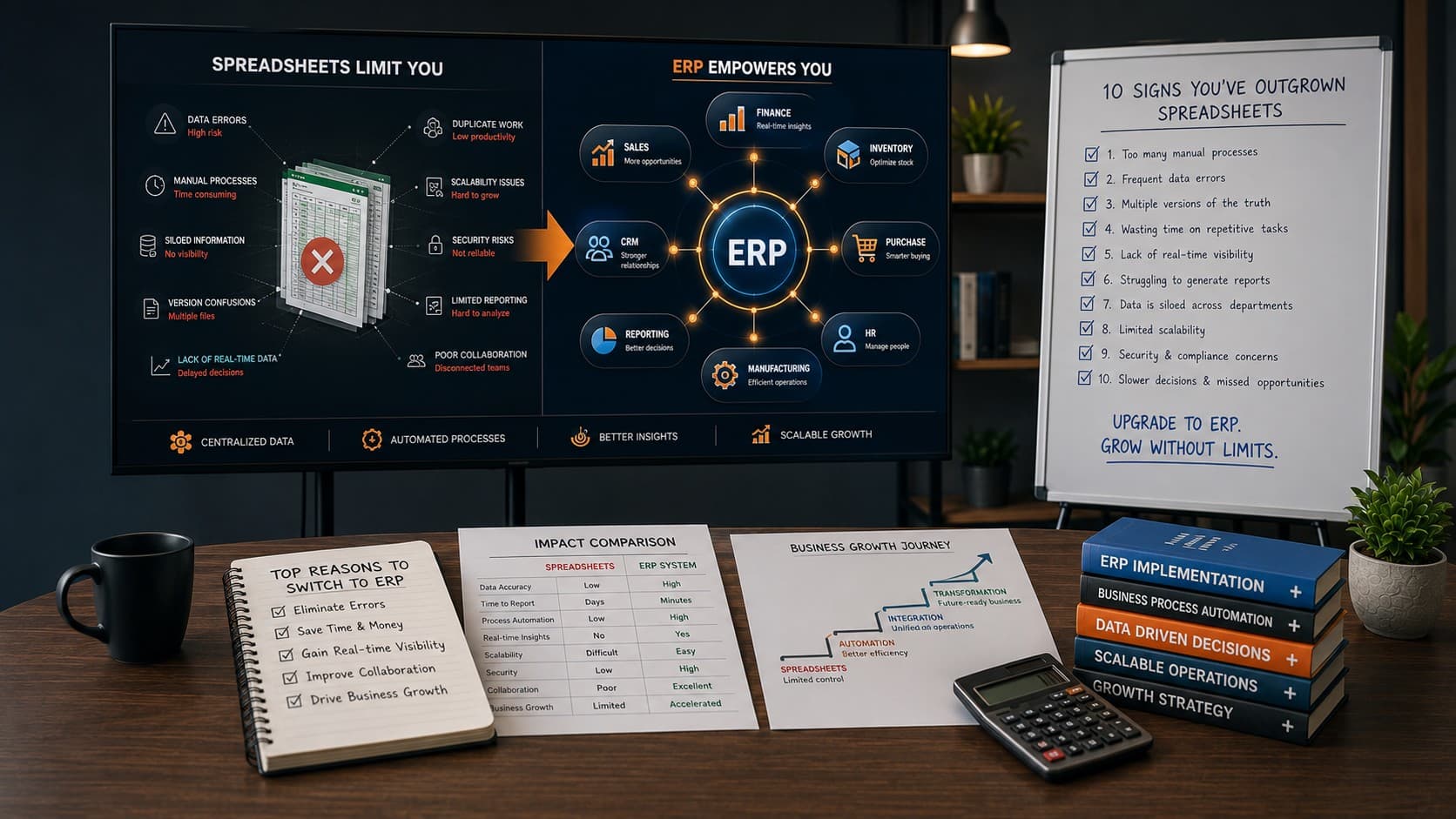
For many growing businesses, spreadsheets begin as an easy and affordable way to manage operations. Customer information, inventory records, employee data, financial reports, and purchase orders all find their way into Excel sheets shared across departments. Initially, this approach works well. But as your organization expands, spreadsheets often become the very thing preventing further growth. Instead of providing clarity, they create duplicate work, inconsistent information, manual errors, delayed reporting, and disconnected teams. Employees spend more time updating files than making informed business decisions. The question isn't whether spreadsheets are useful—they absolutely are. The real question is: Have they become the bottleneck that's slowing your business down? If your answer might be yes, it may be time to consider an Enterprise Resource Planning (ERP) system. This guide explores ten practical signs that indicate your business has outgrown spreadsheets and explains how ERP software helps organizations improve visibility, automate operations, and build a stronger foundation for long-term growth.
What Is an ERP System?
An Enterprise Resource Planning (ERP) system is integrated software that connects different business functions—such as finance, inventory, sales, purchasing, production, HR, customer management, and reporting—within a single platform. Instead of maintaining multiple spreadsheets across departments, everyone works from one centralized database. This provides real-time information, reduces manual effort, improves collaboration, and enables better decision-making. Modern ERP platforms are designed to grow alongside businesses, making them a valuable investment for organizations experiencing operational complexity.
According to Gartner, organizations that successfully implement ERP systems often experience improved operational efficiency, better process visibility, and more consistent decision-making across departments.
Sign #1: Your Team Spends More Time Updating Spreadsheets Than Doing Actual Work
One of the earliest indicators that spreadsheets are limiting productivity is the amount of time employees spend maintaining them. Instead of serving customers, processing orders, or analyzing business performance, staff members find themselves copying data between files, checking formulas, correcting mistakes, and searching for the latest version of a spreadsheet. While each task may seem small, these repetitive activities consume hundreds of hours over the course of a year.
- Multiple versions of the same spreadsheet exist.
- Employees manually copy information between departments.
- Data must be updated repeatedly across different files.
- Managers constantly request status updates because reports aren't live.
When manual administration becomes a significant part of daily operations, the business is no longer benefiting from spreadsheets—it is working for them. An ERP system automatically synchronizes data across departments, eliminating repetitive updates and giving every team access to accurate, real-time information.
Sign #2: Different Departments Are Working With Different Versions of the Truth
As a business grows, information starts moving through multiple teams. Sales updates customer requirements. Finance tracks payments. Inventory teams manage stock. Operations teams handle delivery or production. Management needs reports from everyone.
When each department maintains its own spreadsheet, the same information often appears in different places with different values.
One team may have the updated customer address. Another may still use the old one. Finance may mark an invoice as pending while sales believes it has already been paid. Inventory may show stock availability even though the warehouse has already committed the item to another order.
This creates confusion because teams are no longer working from one reliable source of truth.
- Reports do not match between departments.
- Employees spend time confirming which file is correct.
- Managers receive conflicting numbers from different teams.
- Decisions are delayed because data must be manually verified.
An ERP system solves this by centralizing business data. When one department updates information, every connected team sees the same updated record. This reduces confusion, improves accountability, and helps leaders make decisions based on accurate information.
Sign #3: Manual Errors Are Becoming Too Common
Spreadsheets depend heavily on manual entry. That makes them vulnerable to mistakes, especially when multiple employees update formulas, copy data, rename sheets, or move files between systems.
A small spreadsheet error may seem harmless at first. But in a growing business, one wrong number can create a chain reaction across purchasing, billing, inventory, payroll, or reporting.
Common spreadsheet-related errors include:
- Incorrect formulas
- Duplicate entries
- Missing rows or columns
- Outdated data
- Accidental deletions
- Manual copy-paste mistakes
- Incorrect calculations
These issues are especially risky in businesses where spreadsheets are used for finance, inventory, production planning, student records, logistics, procurement, or compliance reporting.
ERP software reduces manual errors by automating workflows, validating inputs, controlling user permissions, and maintaining structured records. Instead of relying on disconnected files, teams follow defined processes inside one system.
Still Running on Spreadsheets?
If manual updates, duplicate data, and reporting delays are slowing your team down, it may be time to explore a custom ERP system.
Explore Custom ERP →Sign #4: Reports Take Too Long to Prepare
In spreadsheet-driven businesses, reporting often becomes a separate job of its own.
Managers request reports. Employees collect data from different files. Someone verifies totals. Another person formats the sheet. Then leadership reviews the report—only to discover the numbers are already outdated.
This delay makes it difficult to respond quickly to business changes.
If your team needs several hours or days to prepare basic reports, your reporting process is no longer supporting business growth.
Warning signs include:
- Monthly reports require manual consolidation.
- Management cannot view real-time sales, inventory, or financial data.
- Teams depend on one person to prepare reports.
- Reports are outdated by the time they are reviewed.
- Different departments submit reports in different formats.
An ERP system provides dashboards and real-time reporting across departments. Business owners, CFOs, operations managers, and department heads can view updated information without waiting for manual reports.
This improves visibility and allows teams to act faster.
Sign #5: Inventory, Orders, or Finance Are Becoming Difficult to Track
Spreadsheets become especially difficult to manage when business operations involve moving parts such as stock, purchase orders, invoices, payments, deliveries, production schedules, or vendor records.
A retail business may struggle to know which products are available. A manufacturing company may lose visibility into raw materials. A school or college may find it difficult to manage fees, admissions, staff records, and parent communication through separate files.
The problem is not only volume. It is coordination.
When operations, finance, and inventory are disconnected, teams spend more time following up than executing.
- Stock levels are updated manually.
- Purchase orders are tracked in separate sheets.
- Finance teams manually match invoices and payments.
- Operations teams depend on email or calls for status updates.
- Management cannot see operational performance in one place.
ERP software connects these workflows. Inventory updates can reflect in purchase planning. Invoices can connect to orders. Payment status can connect to finance reports. Operations teams can track progress without depending on multiple disconnected files.
Sign #6: Approvals Depend on Phone Calls, Emails, or Personal Follow-Ups
As companies grow, approvals become more important. Purchase requests, expense approvals, stock transfers, fee concessions, quotations, vendor payments, leave requests, and production updates often require review from managers or department heads.
When these approvals are handled through spreadsheets, phone calls, emails, or messaging apps, the process becomes difficult to track.
No one has a clear answer to simple questions:
- Who approved this request?
- When was it approved?
- Why was it rejected?
- Which approvals are still pending?
- Who is responsible for the next action?
This slows execution and creates accountability gaps. Employees wait for confirmation, managers lose track of pending items, and leadership cannot see where work is getting delayed.
An ERP system creates structured approval workflows. Requests move from one responsible person to the next with timestamps, status updates, and approval history. This makes operations more transparent and reduces dependency on informal follow-ups.
Sign #7: Your Business Depends Too Much on One or Two Employees
In many spreadsheet-based businesses, a few employees become the unofficial system owners. They know which file is updated, where the formulas are, how reports are prepared, and which sheet contains the latest information.
This creates a serious operational risk.
If that employee is unavailable, resigns, or makes a mistake, the business may struggle to continue smoothly.
Common signs include:
- Only one person knows how to prepare key reports.
- Teams depend on specific employees to find information.
- Processes are not documented properly.
- Important business logic exists only inside spreadsheets.
- New employees take too long to understand workflows.
An ERP system reduces person dependency by standardizing processes. Business rules, workflows, permissions, reports, and records are managed inside the system rather than in someone's personal spreadsheet folder.
This helps growing companies create continuity, reduce training challenges, and operate more professionally.
Sign #8: Customers, Students, Vendors, or Employees Are Experiencing Delays
Spreadsheet problems are not always visible internally at first. Sometimes the clearest warning sign comes from the people your business serves.
Customers may wait too long for order updates. Students may experience delays in fee confirmations or certificates. Vendors may repeatedly ask about payment status. Employees may struggle to get HR information on time.
These delays often happen because data is spread across departments and no one has instant visibility.
Examples include:
- Customer service teams cannot quickly check order status.
- Finance teams need time to confirm payment details.
- Operations teams manually check delivery updates.
- Schools or colleges manually verify student records.
- HR teams depend on separate files for attendance, payroll, and leave data.
When internal inefficiency begins affecting external experience, spreadsheets are no longer just an internal inconvenience. They are creating business risk.
ERP software improves service quality by giving teams faster access to accurate records, status updates, and process history.
Sign #9: Reporting Takes Days Instead of Minutes
Business leaders rely on reports to make timely decisions. Yet in many organizations still using spreadsheets, generating reports is a manual task that consumes hours—or even days—every week.
Different departments maintain separate files, meaning someone must collect data, verify formulas, remove duplicates, and prepare presentations before management can review performance.
This not only wastes valuable time but also increases the risk of reporting errors that can influence important business decisions.
If your team regularly spends significant time preparing reports instead of acting on them, it's a clear sign that your reporting process needs modernization.
Typical reporting challenges include:
- Sales reports require data from multiple spreadsheets.
- Inventory reports become outdated before they're completed.
- Finance teams manually consolidate monthly numbers.
- Department heads prepare reports independently using different formats.
- Executives receive reports several days after the reporting period ends.
A modern ERP system provides centralized dashboards and real-time reporting. Instead of manually compiling information, decision-makers can instantly access live business metrics whenever they need them.
According to Gartner, organizations increasingly prioritize real-time operational visibility because faster access to accurate data leads to quicker and more informed business decisions.
Sign #10: Your Business Is Growing Faster Than Your Processes
Spreadsheets often work well during the early stages of a business. They are inexpensive, flexible, and familiar to almost everyone.
The challenge appears when growth accelerates.
New employees join. Customer orders increase. Vendors multiply. Multiple branches open. Products expand. Transactions become more frequent. What once felt manageable quickly becomes difficult to control.
Many growing businesses attempt to solve this by creating more spreadsheets, adding more tabs, or hiring additional administrative staff. Unfortunately, this only increases complexity without solving the root problem.
If growth creates more manual work instead of greater efficiency, your operational systems have reached their limit.
Warning indicators include:
- Administrative workload increases faster than revenue.
- Teams spend more time updating spreadsheets than serving customers.
- New hires require extensive manual training.
- Business processes vary across departments or branches.
- Leadership lacks confidence in operational data.
An ERP platform allows businesses to scale without multiplying administrative complexity. Standardized workflows, centralized data, automated reporting, and integrated departments enable sustainable growth while maintaining operational control.
Ready to Replace Spreadsheet Chaos with a Scalable ERP?
If your business is experiencing several of these warning signs, it may be time to move beyond spreadsheets. A custom ERP solution can streamline operations, improve visibility, automate repetitive tasks, and support long-term growth.
Explore Custom ERP Solutions View Our ERP Success StoriesHow to Decide Whether Your Business Is Ready for ERP
Not every company needs an ERP system immediately. However, businesses should seriously evaluate ERP implementation when manual processes begin limiting growth, efficiency, and customer satisfaction.
Ask yourself these questions:
- Are multiple teams maintaining duplicate information?
- Do employees frequently search for the latest spreadsheet version?
- Do managers lack real-time visibility into operations?
- Are manual errors becoming more frequent?
- Do approvals slow down important business activities?
- Are reports taking too long to prepare?
- Is your business expanding across locations or departments?
- Are customers experiencing delays because of internal processes?
If you answered "yes" to several of these questions, investing in ERP may deliver substantial improvements in efficiency, accuracy, collaboration, and decision-making.
Many organizations begin by implementing ERP for one department—such as inventory, finance, or HR—and gradually expand across the business as requirements evolve.
Planning an ERP Implementation for Your Business?
Every business has unique workflows, challenges, and growth goals. Our ERP specialists can help you evaluate your current processes and recommend a solution designed specifically for your organization.
Schedule a Free ERP ConsultationLearn More About ERP DevelopmentFinal Thoughts
Spreadsheets aren't the enemy—they're simply tools that were never designed to manage complex, fast-growing businesses.
As organizations expand, the cost of manual work, disconnected data, reporting delays, and operational inefficiencies continues to increase. What begins as a simple spreadsheet often evolves into hundreds of interconnected files that slow productivity instead of supporting it.
Recognizing the warning signs early gives businesses the opportunity to modernize before operational problems become expensive.
Whether you operate a manufacturing company, educational institution, healthcare organization, logistics business, retail chain, or professional services firm, an ERP solution can centralize information, automate repetitive tasks, improve collaboration, and provide the visibility needed for confident decision-making.
Rather than asking whether spreadsheets are still working, the better question is whether they're helping your business grow—or holding it back.
Frequently Asked Questions
1. How do I know if my business has outgrown spreadsheets?
If your employees spend significant time manually updating files, correcting errors, preparing reports, or searching for information across departments, your business has likely reached the point where an ERP system can deliver greater efficiency and control.
2. What is the biggest advantage of implementing an ERP system?
The biggest benefit is centralized business data. ERP software connects departments through a single platform, reducing duplicate work, improving reporting accuracy, automating workflows, and helping leadership make faster, data-driven decisions.
3. Are spreadsheets completely replaced after ERP implementation?
Not always. Many businesses continue using spreadsheets for personal analysis or temporary calculations, but core operational processes such as finance, inventory, HR, sales, and procurement are managed within the ERP system.
4. Is ERP only suitable for large enterprises?
No. Modern ERP solutions are widely adopted by small and medium-sized businesses. Implementing ERP at the right stage of growth often prevents operational bottlenecks and supports long-term scalability.
5. How long does ERP implementation usually take?
Implementation timelines vary depending on business size, customization requirements, and modules involved. Smaller implementations may take a few months, while enterprise-wide deployments require additional planning and phased execution.
6. Can ERP integrate with existing software?
Yes. Most modern ERP platforms integrate with CRM systems, accounting software, payment gateways, eCommerce platforms, HR tools, business intelligence solutions, and third-party applications through APIs.
7. What departments usually benefit most from ERP implementation?
Finance, inventory management, procurement, HR, production, sales, customer service, and operations typically see the greatest improvements. Since ERP connects these functions, organizations gain better collaboration and a complete view of business performance.
8. Will ERP eliminate manual data entry?
ERP significantly reduces manual data entry by sharing information across departments automatically. While some information still needs to be entered initially, duplicate entries and repetitive administrative work are greatly minimized.
9. How much does a custom ERP solution cost?
The cost depends on the number of modules, business complexity, integrations, customization, and user requirements. Custom ERP projects are typically planned around long-term business goals rather than a fixed template or package.
10. Can ERP help businesses make faster decisions?
Yes. ERP systems provide real-time dashboards, centralized reporting, and live operational insights. Instead of waiting for manually prepared reports, managers can monitor business performance and make informed decisions using up-to-date information.