
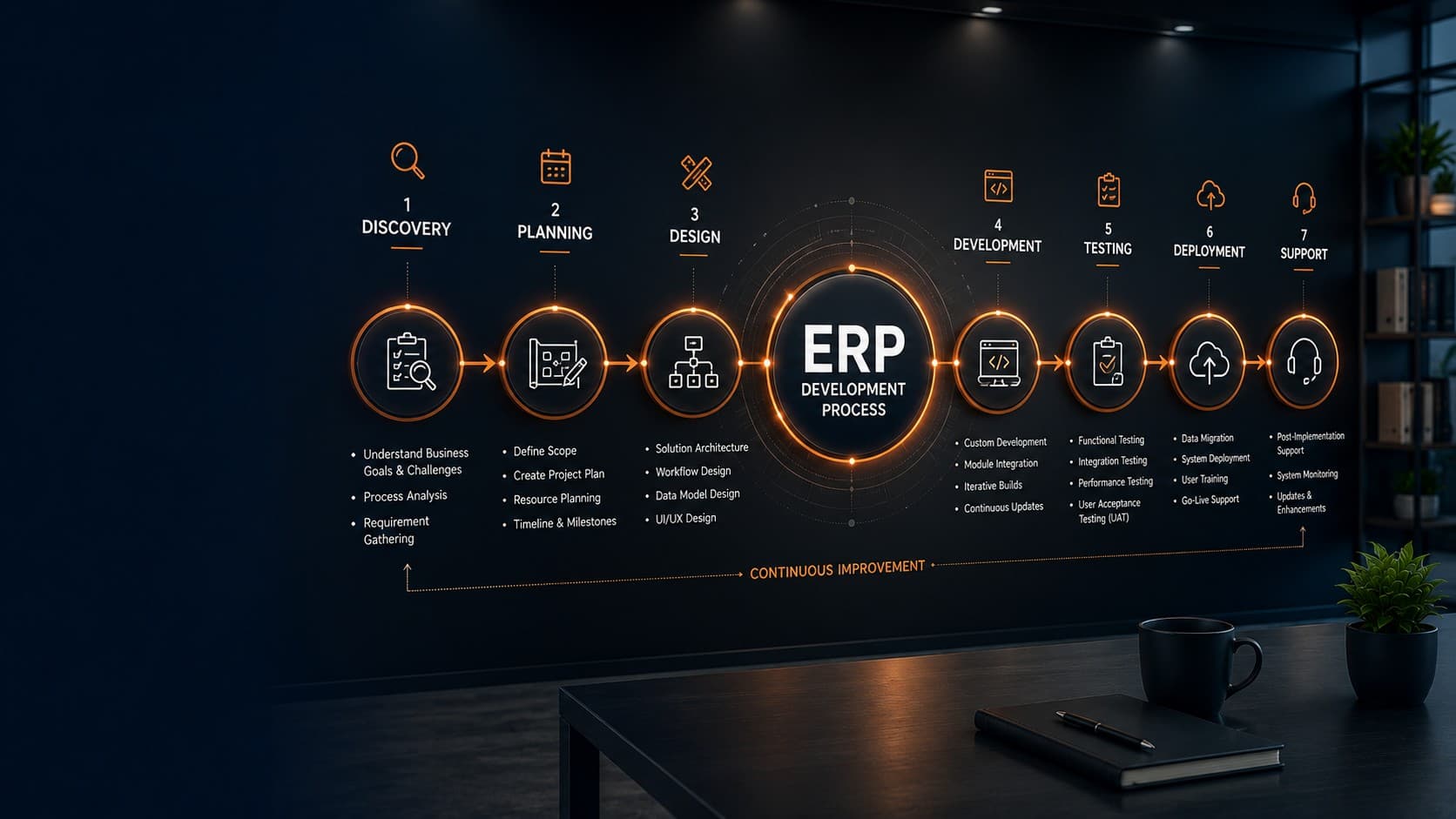
Many organizations assume that custom ERP development begins with writing code. In reality, successful ERP projects start much earlier—with understanding how a business operates, identifying bottlenecks, and defining measurable business objectives.
Whether you're replacing disconnected spreadsheets, modernizing legacy software, or digitizing company-wide operations, every phase of ERP implementation influences the final outcome. Businesses that skip discovery often face scope creep, delayed timelines, budget overruns, and low user adoption after launch.
A structured ERP development process reduces these risks. It provides clear milestones, aligns stakeholders, prioritizes requirements, and ensures that technology supports business goals rather than forcing teams to adapt to generic software.
According to Gartner, organizations that invest time in business process discovery before ERP implementation experience significantly higher project success rates than those that begin development without comprehensive planning.
Why Custom ERP Projects Require a Structured Development Process
Unlike off-the-shelf software, a custom ERP platform is designed around the unique workflows of an organization. Manufacturing, education, logistics, healthcare, retail, finance, and service businesses all operate differently. Their software should reflect those differences.
A structured process ensures every department contributes to the project while preventing unnecessary features, conflicting requirements, and costly redesigns later in development.
Business outcomes of following a structured ERP process
- Reduced implementation risk
- More accurate project estimates
- Higher employee adoption
- Better stakeholder alignment
- Improved reporting and automation
- Greater long-term scalability
Phase 1: Discovery and Business Analysis
Discovery forms the foundation of every successful ERP implementation. During this phase, business leaders, department heads, operational teams, and technical consultants collaborate to understand existing workflows, identify inefficiencies, and establish measurable project goals.
Rather than discussing software features immediately, discovery focuses on understanding how work actually moves through the organization—from customer inquiries and procurement to finance, inventory, HR, production, and reporting.
This phase typically uncovers duplicate processes, manual approvals, spreadsheet dependencies, disconnected systems, and reporting challenges that have accumulated over years of business growth.
Key Activities During the Discovery Phase
- Understanding business objectives and growth plans
- Conducting stakeholder interviews across departments
- Documenting existing workflows and approval processes
- Identifying manual tasks suitable for automation
- Reviewing existing software and third-party integrations
- Defining project scope, priorities, and success metrics
The output of this phase is a comprehensive Business Requirements Document (BRD), process maps, functional requirements, project roadmap, and an implementation strategy that guides the entire ERP development lifecycle.
Planning a Custom ERP Project?
The quality of your discovery phase directly impacts project success. Investing time in understanding business processes before development begins helps reduce implementation risks, improve timelines, and control long-term costs.
Explore Custom ERP Development See ERP Success StoriesPhase 2: Process Mapping and Solution Architecture
Once business requirements are finalized, the next step is translating operational workflows into a scalable software architecture. This phase determines how every department interacts with the ERP platform and how information moves throughout the organization.
Instead of simply recreating existing manual processes, experienced ERP teams redesign workflows to eliminate unnecessary approvals, duplicate data entry, repetitive administrative work, and communication gaps between departments.
Business Process Mapping
Each department is analyzed independently before identifying dependencies across the organization.|
Typical workflows documented include:
- Lead-to-customer conversion
- Procurement and vendor management
- Inventory movement
- Production planning
- Sales order processing
- Purchase approvals
- Expense management
- Payroll workflows
- Customer support operations
- Financial reporting
By visualizing every workflow, organizations gain a clear understanding of where automation creates the highest business value.
Designing the ERP Architecture
After workflow mapping is complete, architects design the technical foundation of the ERP system. Decisions made during this stage affect scalability, security, maintainability, and future integrations.
Typical architectural decisions include:
- Database structure
- User roles and permissions
- Module relationships
- API architecture
- Cloud or on-premise deployment strategy
- Backup and disaster recovery planning
- Authentication and authorization methods
- Audit logging and compliance requirements
A scalable ERP architecture minimizes future redevelopment costs by supporting additional users, locations, modules, and business processes without requiring major structural changes.
Phase 3: UI/UX Design and Prototype Validation
Before development begins, the ERP interface is designed around real business users. Finance teams, HR professionals, warehouse staff, managers, executives, and administrators all interact with the software differently. Their dashboards and workflows should reflect their daily responsibilities.
Interactive prototypes allow stakeholders to validate layouts, navigation, forms, reports, and approval flows before engineering starts. Identifying usability issues at this stage is significantly less expensive than making structural changes after development has begun.
Deliverables from the Design Phase
- Wireframes for every module
- Interactive UI prototypes
- User journey documentation
- Dashboard designs
- Navigation structure
- Responsive layouts for desktop and mobile devices
- Design system and reusable UI components
Phase 4: ERP Module Development
With the business requirements approved and the system architecture finalized, development begins. Rather than building the entire ERP platform at once, experienced teams usually follow an iterative approach, delivering modules in manageable phases while continuously validating progress with stakeholders.
This methodology reduces project risk, allows early feedback, and ensures that each module aligns with business expectations before the next phase begins.
Common ERP Modules Developed
- Customer Relationship Management (CRM)
- Sales Management
- Procurement and Purchasing
- Inventory and Warehouse Management
- Production Planning
- Human Resource Management (HRMS)
- Payroll Management
- Accounting and Finance
- Asset Management
- Project Management
- Service Management
- Business Intelligence and Reporting
Every module is developed according to predefined workflows, approval rules, reporting requirements, and user permissions established during the discovery phase. This ensures consistency throughout the platform while maintaining flexibility for future enhancements.
Custom Development vs Configuration
One of the advantages of a custom ERP solution is that businesses are not forced to adapt their operations to generic software. Instead, the application is designed around existing business processes where appropriate, while also introducing automation opportunities that simplify operations.
Development typically includes:
- Business workflow automation
- Role-based access control
- Notification systems
- Approval workflows
- Custom dashboards
- Document generation
- Data validation rules
- Audit logging
- Advanced reporting
Custom ERP development is not about creating more software—it is about eliminating repetitive work, improving visibility, and supporting better business decisions through intelligent automation.
Phase 5: Integration with Existing Business Systems
Modern organizations rarely operate with a single application. Accounting platforms, payment gateways, CRM systems, HR software, eCommerce platforms, barcode systems, IoT devices, and third-party services often need to exchange information with the ERP platform.
Integration planning ensures these systems communicate reliably while maintaining data consistency across the organization.
Typical ERP Integrations
- Accounting software
- Payment gateways
- Banking APIs
- GST and tax systems
- Email services
- SMS and WhatsApp notifications
- Biometric attendance systems
- Barcode and QR code scanners
- Shipping and logistics platforms
- Business intelligence tools
- Cloud storage providers
API-first architecture is commonly adopted to simplify future integrations and ensure that the ERP platform can evolve alongside changing business requirements.
Looking for an ERP Built Around Your Business?
Every organization operates differently. A custom ERP solution should reflect your workflows, reporting needs, and long-term growth strategy—not force you into rigid processes designed for someone else's business.
Talk to Our ERP Experts Explore Client Success StoriesPhase 6: Quality Assurance and Comprehensive Testing
Before deployment, every ERP module undergoes extensive testing to ensure reliability, performance, and security. Since ERP software supports mission-critical business operations, even minor defects can affect productivity across multiple departments.
Quality assurance teams work closely with developers and business stakeholders to validate both technical functionality and real-world business scenarios.
Testing Activities Include
- Functional testing
- User acceptance testing (UAT)
- Integration testing
- Performance testing
- Security testing
- Cross-browser compatibility testing
- Mobile responsiveness testing
- Data validation testing
- Regression testing
User Acceptance Testing is particularly important because it allows actual business users to verify that the ERP system supports their daily responsibilities before the software goes live.
Phase 7: Data Migration and System Preparation
An ERP system is only as valuable as the quality of the information it contains. Before the new platform goes live, organizations must carefully migrate historical and operational data from spreadsheets, legacy software, and disconnected databases into a clean, standardized structure.
This phase is often underestimated. Poor-quality data can reduce user confidence, create reporting inaccuracies, and introduce operational issues immediately after deployment. A structured migration strategy minimizes these risks while ensuring business continuity.
Typical Data Migration Activities
- Auditing existing business data
- Removing duplicate records
- Standardizing customer and supplier information
- Cleaning product catalogs and inventory records
- Mapping legacy fields to the new ERP database
- Validating imported information
- Performing trial migration exercises
- Reconciling financial balances
Organizations frequently discover outdated, inconsistent, or incomplete records during this stage. Addressing these issues before deployment improves reporting accuracy and prevents future operational problems.
Data migration should never be treated as a simple import exercise. It is an opportunity to improve data quality, standardize business information, and establish a reliable foundation for future decision-making.
Phase 8: Deployment and Go-Live Strategy
After successful testing and data validation, the ERP system is prepared for production deployment. A carefully planned go-live strategy helps minimize disruption while allowing employees to transition smoothly from legacy systems to the new platform.
The deployment approach varies depending on business size, operational complexity, and risk tolerance.
Common ERP Deployment Strategies
- Big Bang Deployment – All departments transition to the new ERP simultaneously.
- Phased Deployment – Individual departments or business units are implemented one at a time.
- Pilot Deployment – A selected location or department uses the ERP before company-wide rollout.
- Hybrid Deployment – Combines multiple deployment approaches based on organizational needs.
For most medium and large organizations, phased deployment offers lower implementation risk by allowing lessons learned during early rollouts to improve later phases.
Go-Live Checklist
- Production servers configured
- Security permissions verified
- Data migration approved
- User accounts created
- Backups completed
- Support teams available
- Monitoring dashboards enabled
- Rollback procedures documented
A successful deployment is measured not only by technical completion but also by how quickly employees adopt the system and continue their daily operations with minimal interruption.
Preparing for Your ERP Implementation?
Successful ERP projects begin long before development starts. Working with an experienced implementation partner helps reduce project risks, improve planning accuracy, and create a solution that supports your long-term business goals.
Discuss Your ERP Requirements Request a Free ConsultationPhase 9: User Training and Change Management
Technology alone does not transform a business—people do. Even the most advanced ERP platform will struggle to deliver value if employees are not confident using it in their daily work.
Successful ERP implementations therefore include structured training programs and change management initiatives that prepare users for new processes, responsibilities, and digital workflows.
Training should be role-specific, practical, and delivered using real business scenarios so employees can quickly apply what they learn after the system goes live.
Effective Training Programs Include
- Department-specific workshops
- Hands-on practice sessions
- User manuals and documentation
- Video learning resources
- Administrator training
- Manager reporting workshops
- Post-launch support sessions
- Knowledge assessments
Phase 10: Post-Deployment Support and Continuous Improvement
Going live is a major milestone, but it is not the end of an ERP project. The first few weeks after deployment are critical because users begin working with live business data, real transactions, and day-to-day operational processes.
Organizations that invest in post-deployment support typically experience faster user adoption, fewer operational disruptions, and greater long-term value from their ERP investment.
Instead of treating deployment as a finish line, successful businesses view it as the beginning of continuous optimization.
Post-Go-Live Activities
- Monitoring application performance
- Resolving user-reported issues
- Optimizing workflows based on feedback
- Adding reports and dashboards
- Implementing enhancement requests
- Security updates and software maintenance
- Database optimization
- Periodic backup verification
- Performance monitoring
- Planning future ERP modules
Many organizations implement ERP in phases, expanding the platform over time as business requirements evolve. This approach allows teams to maximize adoption while minimizing operational disruption.
ERP should evolve alongside your business. Regular reviews and continuous improvements ensure the platform continues delivering value as operations grow, regulations change, and new business opportunities emerge.
Common Challenges During ERP Development—and How to Avoid Them
Even well-planned ERP projects can face challenges if expectations, communication, or project governance are not managed effectively. Recognizing these risks early helps organizations reduce delays and achieve better implementation outcomes.
1. Unclear Business Requirements
When project goals are vague or frequently changing, development teams struggle to deliver a solution that satisfies stakeholders. Comprehensive discovery sessions and documented business requirements significantly reduce this risk.
2. Scope Creep
Adding new features throughout development may seem harmless, but repeated changes often extend timelines and increase project costs. Prioritizing core functionality for the initial release helps maintain momentum while allowing enhancements in future phases.
3. Limited User Involvement
Employees who will use the ERP every day should participate throughout the project—not just during final testing. Their feedback improves usability and increases user adoption after deployment.
4. Poor Data Quality
Migrating outdated or inconsistent information into a new ERP platform creates long-term operational issues. Investing in data cleansing before migration improves reporting accuracy and system reliability.
5. Insufficient Training
Users who are unfamiliar with new workflows may continue relying on spreadsheets or manual workarounds. Practical training, documentation, and ongoing support encourage successful adoption.
How Long Does Custom ERP Development Usually Take?
The timeline for a custom ERP project depends on business complexity, the number of modules, integration requirements, and organizational readiness. While every implementation is different, the following estimates provide a general guideline.
| Project Scope | Estimated Timeline |
|---|---|
| Single Department ERP | 2–4 Months |
| Small Business ERP | 4–6 Months |
| Mid-Sized Enterprise ERP | 6–10 Months |
| Large Multi-Department ERP | 10–18 Months |
| Enterprise-Wide Digital Transformation | 12–24 Months |
Project duration is influenced not only by software development but also by stakeholder availability, data migration, testing, user training, and organizational readiness for change.
How to Choose the Right ERP Development Partner
Selecting the right technology partner is one of the most important decisions in any ERP initiative. A successful implementation depends not only on technical expertise but also on the partner's ability to understand business operations, communicate effectively, and deliver a scalable solution that supports future growth.
The lowest-cost proposal is not always the best investment. Organizations should evaluate ERP partners based on experience, implementation methodology, industry knowledge, support capabilities, and their ability to adapt the software to unique business processes.
Questions to Ask Before Choosing an ERP Partner
- Have they delivered ERP projects similar to yours?
- Do they begin with a structured discovery phase?
- Can they customize workflows instead of forcing standard templates?
- What is their approach to testing and quality assurance?
- Do they provide post-launch support and maintenance?
- How do they manage change requests during development?
- Can they integrate the ERP with your existing applications?
- Will they provide user training and implementation documentation?
An experienced ERP partner acts as a long-term technology advisor rather than simply delivering software. Their understanding of business strategy often has as much impact on project success as their technical capabilities.
Organizations that select implementation partners based on business alignment—not just development cost—typically achieve higher user adoption and stronger long-term return on investment.
Need an ERP Designed Around Your Business Processes?
Every organization has unique operational challenges. A carefully planned custom ERP solution can eliminate manual work, improve visibility across departments, and create a scalable foundation for future growth.
Explore ERP Development Services View ERP Case StudiesWhy Businesses Choose Custom ERP Instead of Off-the-Shelf Software
Off-the-shelf ERP platforms can be suitable for organizations with standardized processes. However, companies operating in specialized industries or with unique workflows often discover that packaged software requires them to change the way they work instead of supporting how they already operate.
Custom ERP development offers greater flexibility by allowing organizations to build software around their own business rules, approval structures, reporting requirements, and operational priorities.
Advantages of a Custom ERP Solution
- Business-specific workflows instead of generic processes
- Custom dashboards for different user roles
- Scalable architecture that grows with the organization
- Seamless integration with existing software
- Improved security and role-based access controls
- Flexible reporting tailored to management requirements
- Reduced dependence on third-party plugins or unnecessary features
- Greater control over future enhancements and roadmap planning
For organizations pursuing long-term digital transformation, custom ERP development often delivers greater operational value than adapting business processes to fit a standardized application.
Real-World Example: From Disconnected Operations to Unified Management
Consider a growing manufacturing company operating across multiple locations. Each department managed information independently using spreadsheets, email approvals, and separate accounting tools. Inventory discrepancies were common, monthly reporting required several days, and managers lacked real-time visibility into production and procurement.
Following a structured ERP implementation, purchasing, inventory, finance, production, and sales were connected through a centralized platform. Automated approvals reduced processing time, live dashboards replaced manual reports, and management gained immediate visibility into operational performance across all locations.
Although every business has different requirements, this type of transformation illustrates why ERP projects should be approached as strategic business initiatives rather than simple software deployments.
Best Practices for a Successful ERP Implementation
While every ERP project is unique, successful implementations consistently follow a set of proven best practices. Organizations that prioritize planning, stakeholder involvement, and continuous communication are more likely to achieve measurable business outcomes than those focused solely on software delivery.
An ERP platform should support long-term business strategy, not simply replace existing spreadsheets or legacy systems. Treating implementation as an organizational transformation rather than an IT project leads to stronger adoption and higher return on investment.
ERP Implementation Best Practices
- Define measurable business objectives before development begins.
- Secure executive sponsorship throughout the project.
- Assign dedicated representatives from each department.
- Prioritize business-critical modules for the initial release.
- Maintain a controlled change management process.
- Invest in comprehensive user training.
- Perform multiple rounds of testing before deployment.
- Measure post-launch performance using predefined KPIs.
- Schedule continuous improvement reviews after implementation.
Organizations that follow these practices are better positioned to reduce implementation risks while maximizing the long-term value of their ERP investment.
Technology alone does not create operational excellence. Successful ERP implementations combine the right software, well-defined processes, engaged employees, and strong executive leadership.
Key Metrics to Measure ERP Success
After deployment, organizations should evaluate whether the ERP system is delivering the business outcomes identified during the discovery phase. Measuring success using objective performance indicators helps determine future optimization priorities and demonstrates return on investment.
Operational Metrics
- Reduction in manual data entry
- Decrease in reporting preparation time
- Faster order processing
- Improved inventory accuracy
- Reduced approval turnaround time
- Lower operational costs
- Improved employee productivity
- Reduction in business process errors
Strategic Metrics
- Higher customer satisfaction
- Improved decision-making speed
- Better financial visibility
- Greater process standardization
- Improved compliance and audit readiness
- Higher employee adoption rates
- Support for business expansion
Reviewing these metrics regularly ensures that the ERP platform continues evolving alongside business objectives rather than remaining a static system after implementation.
Thinking About Modernizing Your Business Operations?
Whether you're replacing spreadsheets, upgrading legacy software, or planning enterprise-wide automation, a structured ERP strategy can help your organization operate more efficiently while supporting future growth.
Speak With Our ERP Specialists Discover Custom ERP SolutionsFinal Thoughts
A successful ERP implementation is never defined solely by launching new software. Its true value lies in improving how an organization operates every day—connecting departments, simplifying workflows, reducing manual effort, and providing reliable information for better business decisions.
The journey from discovery to deployment involves careful planning, process analysis, thoughtful design, quality development, comprehensive testing, user training, and continuous improvement. Every phase contributes to a platform that supports long-term operational excellence rather than short-term technology goals.
Businesses that invest in a structured ERP development process are better prepared to adapt to market changes, scale efficiently, improve customer experiences, and make confident decisions based on accurate, real-time information.
Instead of asking when to implement an ERP system, organizations should ask whether their current processes can continue supporting tomorrow's growth. When operational complexity begins limiting productivity, collaboration, and visibility, a well-planned custom ERP solution becomes a strategic investment rather than simply another software project.
Frequently Asked Questions
1. What is the custom ERP development process?
The custom ERP development process is a structured methodology that includes business discovery, process analysis, solution architecture, UI/UX design, software development, testing, deployment, user training, and ongoing support. Each phase ensures the ERP system aligns with an organization's unique workflows and long-term business objectives.
2. How long does it take to build a custom ERP system?
Development timelines vary depending on project complexity, integrations, and business requirements. Small ERP implementations may take three to six months, while enterprise-wide ERP systems with multiple modules and locations can require twelve months or longer.
3. Why is the discovery phase important in ERP development?
Discovery identifies business goals, existing workflows, operational bottlenecks, reporting needs, and automation opportunities before development begins. A strong discovery phase minimizes scope changes, improves planning accuracy, and increases the likelihood of project success.
4. What departments can be included in a custom ERP solution?
A custom ERP can support finance, accounting, procurement, inventory, warehouse management, production, HR, payroll, CRM, sales, customer support, project management, asset management, and executive reporting within a single integrated platform.
5. Can a custom ERP integrate with existing business software?
Yes. Modern ERP systems are commonly integrated with accounting software, payment gateways, banking APIs, eCommerce platforms, biometric devices, logistics providers, CRM systems, business intelligence tools, and other third-party applications using secure APIs.
6. Is custom ERP better than off-the-shelf ERP software?
It depends on business requirements. Organizations with unique workflows, specialized reporting needs, or industry-specific processes often benefit from custom ERP solutions because the software is designed around their operations instead of requiring them to adapt to standardized processes.
7. What are the biggest risks during ERP implementation?
Common risks include unclear business requirements, poor data quality, limited stakeholder involvement, inadequate user training, uncontrolled scope changes, and insufficient testing. Proper planning and governance significantly reduce these implementation risks.
8. How do businesses measure ERP implementation success?
Success is typically measured through improved reporting speed, reduced manual work, increased productivity, higher inventory accuracy, faster approvals, improved customer service, greater employee adoption, and stronger visibility into business operations.
9. Do employees need training before using a new ERP system?
Yes. User training is one of the most important success factors in ERP implementation. Practical, role-based training enables employees to adopt new workflows quickly, reduces resistance to change, minimizes errors, and improves overall productivity after the system goes live.
10. Does an ERP system continue improving after deployment?
Absolutely. ERP platforms are designed to evolve with the business. Organizations regularly introduce new modules, automate additional workflows, improve dashboards, integrate new applications, and optimize performance based on changing operational needs and user feedback.
11. How much does custom ERP development cost?
ERP development costs depend on the number of modules, integrations, customization requirements, user count, infrastructure, and implementation complexity. A detailed discovery phase is typically required to estimate the project accurately.
12. How do I choose the right ERP development company?
Look for a development partner with proven ERP implementation experience, a structured discovery process, strong technical expertise, industry knowledge, transparent communication, long-term support services, and the ability to build software around your business processes rather than forcing standardized workflows.