
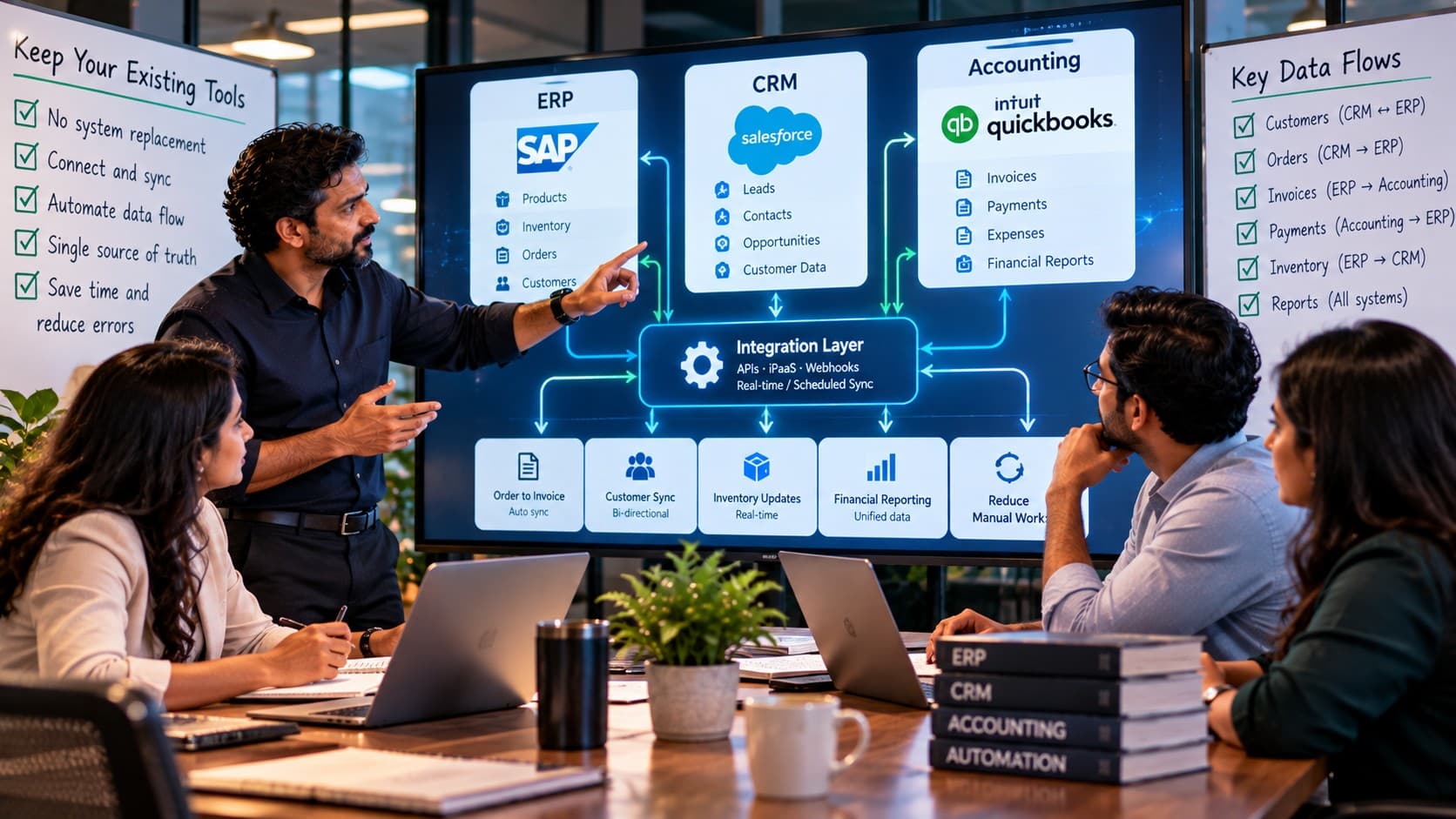
Your systems may work perfectly on their own while creating hours of manual reconciliation together. This guide shows how to connect them carefully, choose the right data flows, and keep finance and operations in control.
A sales manager can see the deal. A warehouse manager can see the stock. An accountant can see the payment. But nobody can see the whole transaction without calling someone else. The problem is not necessarily the software; it is the gap between its records.
When existing platforms do their individual jobs well, replacing them can introduce new expense and disruption without fixing data ownership. Connecting the systems can be a better choice—but only when each handoff has clear rules, useful identifiers, and a plan for failure.
This article explains how to join ERP, CRM, and accounting workflows without making finance, operations, or customer records less reliable.
When good software creates a disconnected business
A confirmed customer order reaches sales, but the warehouse still waits for someone to copy it into the ERP. Finance then re-enters the invoice in the accounting platform. A payment arrives, yet the CRM continues to show the customer as overdue. None of the applications is necessarily broken; the handoffs between them are.
For teams running three or more tools, ERP CRM accounting integration is often a more sensible first move than replacing an application people already know. Connecting systems does not mean collapsing everything into one database. It means making selected business events travel reliably to the next system, with clear rules for ownership and exceptions.
Consider a distributor with a mature ERP for stock, a CRM the sales team actually uses, and an accounting package the finance team trusts. The useful question is not which one to discard. It is which information must cross the boundaries, at what point, and under whose control.
Before spending on a platform migration, write down the handoffs that require double entry, email follow-ups, or manual reconciliation. Those handoffs are your integration candidates. KSoft Technologies describes connecting existing software as part of its business automation services, rather than assuming replacement is necessary.
How do ERP, CRM and accounting integrations actually work?
ERP, CRM and accounting integrations exchange selected records and events through supported interfaces so each application can do its own job without repeated entry. A CRM may send an approved order to the ERP, while the ERP sends an invoice-ready transaction to accounting. Responses and errors are recorded instead of silently ignored.
The practical mechanism depends on what each product supports. Modern platforms may offer REST APIs, webhooks, native connectors, or scheduled data exports. A webhook signals that something changed; an API retrieves or updates the related information. Batch files can be appropriate when a vendor has no dependable real-time interface.
Four common ways to connect existing applications
- Native connectors: Vendor-supported integrations suit standard workflows when their data mappings and permissions fit your requirements.
- Integration platform: A managed automation service can route common events between supported products, with limits around complex logic and volume.
- Custom API integration: A small integration service handles company-specific approval states, transformations, retries, and monitoring.
- Controlled batch transfer: Scheduled files can handle reference data or daily summaries when real-time connectivity is unnecessary.
Direct database writes into another vendor's system should generally be avoided: they can bypass validation and leave support teams unable to trace a change. Ask each vendor about API limits, authentication, supported event types, and any restrictions before choosing an approach.
Which data should move between ERP, CRM and finance?
Only data required for an actual business decision or transaction should move between ERP, CRM and accounting software. Customer identity, approved orders, stock availability, invoice references, and payment status are common candidates. Internal notes, unfinished quotations, and unrelated finance details usually do not need to be copied everywhere.
Map information as business events, not as a demand to mirror entire databases. A sales representative may need to know whether a customer is on credit hold, but not the accounting team's complete general ledger. Finance may need the tax treatment and order reference without receiving every CRM activity note.
| Data or event | Primary owner | Typical destination | Business rule |
|---|---|---|---|
| Lead and opportunity | CRM | ERP after approval | Transfer only confirmed orders |
| Item and available stock | ERP | CRM | Publish usable availability, not raw warehouse movements |
| Approved sales order | ERP or CRM, by process | Fulfillment and finance | Preserve one stable order identifier |
| Invoice and tax posting | Accounting system | ERP and CRM summaries | Do not create parallel accounting books |
| Payment settlement | Accounting system | ERP and CRM | Sync confirmed status, including reversals |
The crucial design decision is system of record: which application is allowed to create or correct a particular field. An ERP can own inventory quantities while the CRM owns prospect-stage notes. The ownership model will differ by company, but ambiguous ownership is a reliable source of conflicting data.
Three useful tools. Too many manual handoffs?
Identify where duplicate entry and delayed status updates are slowing operations.
Review Your Integration GapsWhy does duplicate entry survive after a software rollout?
Duplicate entry persists when teams automate screens but leave cross-department approval and data ownership untouched. A CRM may create an order, yet finance refuses to use it until someone verifies a separate spreadsheet. The extra work is often protecting against unclear status, incomplete fields, or missing audit evidence—not simply a lack of API access.
Look for records with the same meaning but different names: “client ID” in the CRM, “party code” in ERP, and “debtor number” in accounting. A reliable connection needs a mapping table and stable identifiers. Matching customers by business name alone is fragile when names change, branches share a name, or records contain spelling differences.
Resolve the vocabulary before writing integration code
Define what “confirmed,” “invoiced,” “paid,” “cancelled,” and “returned” mean in each application. One platform may consider an order complete when dispatched; another may wait for payment. Moving a status without translating its meaning creates misleading dashboards.
A sensible integration specification lists fields, required formats, source and destination IDs, permitted transitions, and the person who approves changes. This is more useful than a diagram showing three logos connected with arrows.
Start with one workflow that crosses all three systems
The first useful integration is often a narrow order-to-cash flow. It touches sales, operations, and finance, but can be tested with a limited set of records. Starting here avoids the risk of synchronizing every customer, product, and historical transaction before the business has agreed on the rules.
- Qualified opportunity: CRM remains responsible for the sales pipeline and contact history.
- Approved order: The business confirms required fields and sends the order through a documented interface.
- Stock allocation: ERP validates items, quantities, availability, and any operational restrictions.
- Invoice creation: Accounting receives the permitted transaction data and issues or records the financial document.
- Payment reconciliation: Finance confirms settlement and makes an appropriate status visible to sales and operations.
- Exception handling: Credit holds, changed orders, refunds, and cancellations follow explicit review paths.
One transaction should carry a durable reference from the first confirmed order through invoice and payment. When the reference is missing, staff cannot tell whether a failed transfer should be retried or manually recreated.
If your operational model is more complicated, the existing ERP design guide explores defining process ownership and integration boundaries before development. For an integration-only project, the same principle applies without requiring a new ERP build.
A practical integration checklist before you connect anything
Before connecting applications, decide what must happen, which system authorizes it, and how the business will know when a transfer fails. Technical access is only the beginning. The following checklist can be completed with an operations lead, a finance representative, a system administrator, and whoever owns the integration.
Map the process and data
- Select one start event, such as “order approved,” and one measurable finish event, such as “invoice visible in accounting.”
- Record mandatory fields, tax codes, customer identifiers, currency, units of measure, and approval conditions.
- Specify whether each field is read-only, editable, or derived in the destination.
- State whether updates should be event-driven, periodic, or manually approved.
Set the controls and operating owners
- Use scoped service credentials and assign responsibility for renewing or rotating them.
- Define a unique event or transaction key so retries do not create duplicate invoices or orders.
- Keep a visible queue for failures, with an owner and escalation threshold.
- Record when and why an operator manually overrides a synchronization result.
- Agree on the reconciliation report that will prove the books and operational records still match.
Test failure, not only success
Test a duplicate webhook, a cancelled order, a missing customer code, a failed API response, and a partially completed invoice. Confirm that the source application stays usable, that a retry is safe, and that someone can locate the failed record without asking a developer to inspect server logs.
This is the practical bridge between a working demonstration and an integration that finance and operations can trust.
What does a realistic first integration project look like?
Consider an illustrative wholesale business with 18 sales and operations staff. Sales enters orders into CRM, inventory is maintained in ERP, and accounts are finalized in a separate finance tool. Three times a day, an administrator downloads orders and retypes them. Customers sometimes receive follow-up calls after paying because the CRM has not been updated.
Instead of replacing the tools, the business selects one order category and two account managers for a pilot. It maps the approved-order event, synchronizes approved customer IDs, and passes invoice references to finance. Payment status returns only after accounting confirms settlement.
The pilot includes deliberately rejected transactions: a product code that does not exist in ERP, a customer with a credit hold, and a repeated invoice request. Finance checks the resulting amounts against its own ledger. Only after reconciliation is reliable does the team extend the workflow to more users.
This example is hypothetical, not a reported customer result. Its value is the rollout pattern: one measurable workflow, named record owners, exception testing, then controlled expansion.
Design One Dependable Data Flow
Map your system owners, transactions and exceptions before committing to a connector.
Discuss Your Integration ScopeSeven mistakes that make system integration expensive
Most damaging integration mistakes are business-rule mistakes disguised as technical problems. A service that successfully sends records can still corrupt operations if it moves the wrong information or cannot explain why a transaction changed.
- Synchronizing everything: Copying whole datasets creates unnecessary exposure, conflicts, and maintenance. Move only fields with a defined use.
- Two-way edits without ownership: If both CRM and ERP can change the same address, set a field-level owner and conflict policy.
- Skipping idempotency: Retries need stable keys so the same invoice or order is not posted twice.
- Ignoring historical exceptions: Legacy customer duplicates and inconsistent tax codes must be cleaned or quarantined.
- Assuming real time is essential: Event-driven stock availability may matter; a daily management summary may not.
- Using privileged accounts: Give the integration minimum permissions and protect credentials as production secrets.
- Launching without monitoring: Error counts, delayed records, reconciliation mismatches, and credential expiry need named owners.
When someone proposes a new middleware service, ask who will operate it six months later. A technically elegant connector without documented runbooks simply creates another system your team must manage.
Native connector, automation platform or custom integration?
The right integration method depends on data sensitivity, process complexity, vendor support, and ongoing support capacity. Use a native connector when it reliably handles a standard mapping. An automation platform can help with moderate workflow orchestration. A custom service earns its cost when business rules, approvals, transformations, and exception recovery exceed what packaged connectors support.
Compare the full operating cost, not only the setup invoice. Review connector subscription costs, API quotas, monitoring, failure recovery, security reviews, vendor changes, and who supports incidents. A small connector may become expensive if nobody notices a failed transaction until month-end close.
KSoft Technologies lists system integration and API connectivity alongside workflow automation. The correct scope may be a targeted connection, not a large application rewrite. For businesses that truly need deeper process redesign, its custom ERP development service addresses a broader problem than linking existing systems.
Security, access and reconciliation are part of the integration
ERP and accounting records can contain commercially sensitive and personal information. An integration should reduce unnecessary copying rather than multiplying data across applications. Design service accounts with least privilege, encrypt data in transit, protect tokens and secrets, and define retention rules for integration logs.
Do not assume an API token's presence means a record can be changed. Decide which roles may approve refunds, edit bank details, release credit holds, and alter invoice postings. Security controls should exist in the owning application and be respected by the connector.
Finance also needs a reconciliation method. An integration dashboard showing “successful requests” cannot prove that tax totals, invoices, and settled payments agree. Agree on counts, totals, unmatched reference reports, and a review frequency appropriate for transaction volume.
If an accounting service experiences an outage, queue permitted operations safely, avoid duplicate creation when it returns, and make the delay visible to the right team. Reliability means recoverability, not merely uptime.
When should you keep the tools, and when should you replace one?
Keep an existing application when it still supports required business processes, has maintainable integration options, and remains secure and supported. Replacement becomes reasonable when its limitations cannot be addressed safely through available interfaces, its data model blocks necessary controls, or ongoing maintenance clearly outweighs transition cost.
Ask three questions before commissioning a migration: Does the application still perform its main job well? Can supported interfaces provide the required data at acceptable reliability? Will joining the systems actually remove manual work, or merely move it to a different screen?
Some older software exposes only CSV exports. That may still support an honest daily integration for low-frequency operations. A platform that offers an API but cannot enforce your required approval sequence may be a weaker fit than expected.
When the underlying system really is the constraint, review replacement deliberately. Do not disguise a major application migration as a small connectivity project.
A staged rollout that the business can verify
Begin with a one-page system map: applications, system owners, record ownership, data flows, approval gates, and failure contacts. Choose a pilot involving a useful transaction and a limited set of users. Write acceptance conditions in business language before asking engineers to implement endpoints.
Phase 1: Prove the data flow
Confirm vendor permissions, sandbox access, mapping, and IDs. Use non-production records or carefully controlled test data. Verify standard, duplicate, rejected, and cancelled transactions.
Phase 2: Run in parallel
For a defined period, compare automated outputs against the current manual process. Keep a reconciliation log. Do not switch off a finance control just because several test transactions succeeded.
Phase 3: Expand with ownership
Add workflows one at a time. Document support steps, monitoring, credentials, and escalation rules. Define who approves a change to mapping, especially for tax, credit, price, or payment-related fields.
The most useful acceptance question is not “Did the API work?” It is “Can the business complete the process accurately, explain exceptions, and recover safely when a system becomes unavailable?”
Connect the handoffs before replacing the software
Your ERP may remain the right place for inventory. Your CRM may still be the right place for customer conversations. Accounting may already satisfy the controls finance needs. The missing capability is often a dependable route between approved business events, not another all-in-one subscription.
Start by tracing one confirmed order from sales through delivery, invoice, and payment. Note every point where someone re-enters information, asks for a status by email, or fixes a mismatch in a spreadsheet. Assign one system to own each record and decide which updates other systems actually need.
Then test that connection under realistic failures, with the people who will use and reconcile it. A controlled integration does not promise that exceptions disappear; it gives the business a reliable way to find and resolve them.
The first step is a clear data-flow decision. Software comes after that.

Keep the Software. Fix the Connections.
Review what your current applications can exchange and define a practical first integration.
Plan an Integration ReviewFrequently Asked Questions
Can ERP, CRM and accounting software work together without being replaced?
Yes. Existing ERP, CRM and accounting software can exchange records through vendor-supported APIs, native connectors, integration platforms or scheduled files. The best method depends on access and business rules. First identify which system owns each record, then connect only the events that genuinely need to cross departmental boundaries.
What is the difference between ERP integration and ERP replacement?
ERP integration keeps the existing ERP and connects it to other applications. ERP replacement retires or significantly rebuilds that system. Integration is usually the smaller change when the ERP still handles operations well. Replacement may be needed when core functionality, vendor support, security or necessary data access is no longer adequate.
Why do customers appear differently in CRM and accounting?
Customer records can differ because teams create them independently, use different identifiers, or update fields in only one application. Define a primary customer ID, set ownership for billing and contact fields, and reconcile duplicates before syncing. Matching by business name alone can create incorrect account links when names are similar.
Which system should own invoice and payment status?
The accounting system should generally own posted invoices, settlement and ledger status when it is the official finance record. ERP and CRM may receive carefully selected summaries. The final policy depends on existing workflows, but neither sales nor an integration script should independently overwrite posted finance transactions without approved controls.
How often should ERP and CRM information synchronize?
Synchronization frequency should follow operational need. Sales may need current stock availability at order time, while a monthly report needs no instant update. Compare the cost of delay with API limits, processing volume and reliability. Event-driven updates suit time-sensitive changes; scheduled batches can handle less urgent information.
How do you prevent duplicate orders or invoices during retries?
Use a persistent transaction identifier and idempotent processing, so repeating a request does not create another business record. Store the result of prior attempts and reconcile acknowledgements before retrying. Test interrupted requests and duplicate webhooks before launch, because network errors can occur even when the destination processed the original transaction.
Can we integrate older accounting software with no modern API?
Sometimes. A supported file import, scheduled export, vendor connector or approved intermediary can exchange useful information without direct API access. Review data freshness, security and reconciliation requirements first. Avoid writing directly to unsupported application databases because this can bypass validation and create records the vendor cannot support.
Is a native connector better than a custom API integration?
A native connector is often preferable for a standard, vendor-supported flow because setup and maintenance can be simpler. A custom API integration may fit better when you have unusual approvals, transformations, or error-handling requirements. Evaluate ongoing costs, permissions, transaction limits and incident ownership rather than selecting on setup price alone.
What should we integrate first if we use three or more tools?
Start with one costly handoff involving repeated entry or delayed decisions. A common candidate is an approved sales order moving from CRM to ERP, followed by an invoice reference reaching finance. Select a limited pilot, name data owners, and test mismatches before connecting every record or department.
How long does it take to integrate existing business systems?
Integration time varies with API access, data quality, approval complexity, security requirements and the number of workflows. A standard connector and a customized order-to-cash process have very different scopes. A useful estimate requires a field map, exception list, vendor access review and test plan rather than an assumed universal timetable.
How much does ERP, CRM and accounting integration cost?
Cost depends on the products involved, their interface capabilities, workflow complexity, transaction volume, security controls and maintenance needs. License fees for integration platforms may continue after launch. Request a scoped estimate covering discovery, mapping, testing, monitoring and ongoing support, not only the initial connection between APIs.
When should a business replace software instead of integrating it?
Consider replacement when a system cannot support essential workflows, has unacceptable security or support risk, or lacks any reliable way to exchange the records operations require. Also compare long-term integration maintenance with migration cost. An existing product that works well for its own users should not be replaced solely because another application needs its data.